Google Maps Crashes Bluetooth Connection

Dude

Badlands
Well-Known Member
Joined
Sep 20, 2022
Threads
108
Messages
4,339
Reaction score
5,007
Location
Arizona
Vehicle(s)
2022 Bronco Sport Badlands
When using bluetooth with iPhone, Google Maps works for a few seconds and then crashes the bluetooth connection with phone. I've done a reset on the menu screen and also downloaded the latest software on phone and on Bronco Sport. Has anyone else had this problem and did you find a fix? I called a Ford service department, but they said they had never heard of this issue- shocking haha. It's been going on for months and is driving me nuts. Switched to Waze, nothing will make it play on speakers when on a call, even when that setting is enabled.
@Maddy3
I replicated your scenario but not the issue you are having:

iPhone 15 Pro: iOS 18.3.2 (not the latest because 18.4 is buggy)

Sync version: 3.4 23188 (latest)

iPhone connected to Sync using Bluetooth and is not plugged into any USB Port

Google Maps running on the iPhone and works fine - voice directions come out over the vehicles speakers and Google Maps does not “crash” for me

Can you please provide more info - you said “Google Maps works for a few seconds and then crashes the bluetooth connection with phone” - what does crashes mean? Can you be more specific?

Later in your post you said “nothing will make it play on speakers when on a call, even when that setting is enabled”

Also see my Note below which states:
Note: Google Maps directions will not play over SiriusXM or other audio sources.

What is the specific setting you are referring to that you enabled? A setting on the Sync 8” Display or a setting on the iPhone - what is the exact setting you refer to?


Here are Google Maps settings that I use:

iPhone Google Maps unmute voice directions (when CarPlay inactive):
1. Requires 8” Display Source set to iPhone (Bluetooth).

Note: Google Maps directions will not play over SiriusXM or other audio sources.

On the iPhone, in Google Maps App: Settings, Navigation:
(1) Sound & voice Guidance audio: Unmute
(2) Guidance volume: Normal
Enable:
(3) Play voice over Bluetooth
(4) Play as Bluetooth phone call (this turns off audio sources when Google Maps is speaking)

iPhone Google Maps voice volume level (when CarPlay inactive): adjust the vehicle radio volume to a reasonable level when Google Maps is providing Navigation directions

Google Maps - play Apple Music while navigating:
(1) In Google Maps, Settings, Navigation, Music playback controls: select Apple Music
(2) iPhone Settings->Google Maps: enable Media & Apple Music

Finally in the Google Maps App on the iPhone, make sure the audio (the little speaker) icon is not muting the audio.


So I am not able to replicate the issue you are having and I haven’t tried lately having Google Maps Navigation directions occurring while I am on an iPhone voice call so I’ll try that later.
Sponsored
 

Me3

Well-Known Member
First Name
Paul
Joined
Mar 4, 2025
Threads
3
Messages
183
Reaction score
272
Location
Northern Nevada
Vehicle(s)
RAV4
@Maddy3
I replicated your scenario but not the issue you are having:

iPhone 15 Pro: iOS 18.3.2 (not the latest because 18.4 is buggy)

Sync version: 3.4 23188 (latest)

iPhone connected to Sync using Bluetooth and is not plugged into any USB Port

Google Maps running on the iPhone and works fine - voice directions come out over the vehicles speakers and Google Maps does not “crash” for me

Can you please provide more info - you said “Google Maps works for a few seconds and then crashes the bluetooth connection with phone” - what does crashes mean? Can you be more specific?

Later in your post you said “nothing will make it play on speakers when on a call, even when that setting is enabled”

Also see my Note below which states:
Note: Google Maps directions will not play over SiriusXM or other audio sources.

What is the specific setting you are referring to that you enabled? A setting on the Sync 8” Display or a setting on the iPhone - what is the exact setting you refer to?


Here are Google Maps settings that I use:

iPhone Google Maps unmute voice directions (when CarPlay inactive):
1. Requires 8” Display Source set to iPhone (Bluetooth).

Note: Google Maps directions will not play over SiriusXM or other audio sources.

On the iPhone, in Google Maps App: Settings, Navigation:
(1) Sound & voice Guidance audio: Unmute
(2) Guidance volume: Normal
Enable:
(3) Play voice over Bluetooth
(4) Play as Bluetooth phone call (this turns off audio sources when Google Maps is speaking)

iPhone Google Maps voice volume level (when CarPlay inactive): adjust the vehicle radio volume to a reasonable level when Google Maps is providing Navigation directions

Google Maps - play Apple Music while navigating:
(1) In Google Maps, Settings, Navigation, Music playback controls: select Apple Music
(2) iPhone Settings->Google Maps: enable Media & Apple Music

Finally in the Google Maps App on the iPhone, make sure the audio (the little speaker) icon is not muting the audio.


So I am not able to replicate the issue you are having and I haven’t tried lately having Google Maps Navigation directions occurring while I am on an iPhone voice call so I’ll try that later.
Thanks for this info. I’ve been wanting to get google maps to talk to me and wasn’t sure how to set it up.
 

Dude

Badlands
Well-Known Member
Joined
Sep 20, 2022
Threads
108
Messages
4,339
Reaction score
5,007
Location
Arizona
Vehicle(s)
2022 Bronco Sport Badlands
Thanks for this info. I’ve been wanting to get google maps to talk to me and wasn’t sure how to set it up.
Yes .. it’s pretty simple on an iPhone and probably also for android

I also disable other things like text messages (don’t want text messages popping up in the vehicle), disable contact lists, etc.

And 99% of the time I plug in my iPhone so it charges and uses CarPlay
 

Me3

Well-Known Member
First Name
Paul
Joined
Mar 4, 2025
Threads
3
Messages
183
Reaction score
272
Location
Northern Nevada
Vehicle(s)
RAV4
Yes .. it’s pretty simple on an iPhone and probably also for android

I also disable other things like text messages (don’t want text messages popping up in the vehicle), disable contact lists, etc.

And 99% of the time I plug in my iPhone so it charges and uses CarPlay
“I also disable other things like text messages (don’t want text messages popping up in the vehicle), disable contact lists, etc.”

How did you do this- on the sync screen or the iPhone?

I did the same thing a while back, I thought on my iPhone, but I don’t see a way to do it now. I’ll have to check the sync screen…
 

Dude

Badlands
Well-Known Member
Joined
Sep 20, 2022
Threads
108
Messages
4,339
Reaction score
5,007
Location
Arizona
Vehicle(s)
2022 Bronco Sport Badlands
“I also disable other things like text messages (don’t want text messages popping up in the vehicle), disable contact lists, etc.”

How did you do this- on the sync screen or the iPhone?

I did the same thing a while back, I thought on my iPhone, but I don’t see a way to do it now. I’ll have to check the sync screen…
These are on your iPhone:

Disable iPhone text message notifications from appearing on 8” screen:
Notifications -> Announce Notifications -> CarPlay -> Announce Messages [Off]

Disable iPhone text messages from appearing on 8” screen:
Notifications -> Messages -> Show in CarPlay [Off]

I did not enable: Receiving iPhone text messages with SYNC 3:
https://www.ford.com/support/how-tos/sync/sync-3/receiving-iphone-text-messages-with-sync-3/

And this one is from the Sync 8” Display:
Settings ->Phone
Text Messaging (set to Off)
 
  • Like
Reactions: Me3


Me3

Well-Known Member
First Name
Paul
Joined
Mar 4, 2025
Threads
3
Messages
183
Reaction score
272
Location
Northern Nevada
Vehicle(s)
RAV4
These are on your iPhone:

Disable iPhone text message notifications from appearing on 8” screen:
Notifications -> Announce Notifications -> CarPlay -> Announce Messages [Off]

Disable iPhone text messages from appearing on 8” screen:
Notifications -> Messages -> Show in CarPlay [Off]

I did not enable: Receiving iPhone text messages with SYNC 3:
https://www.ford.com/support/how-tos/sync/sync-3/receiving-iphone-text-messages-with-sync-3/

And this one is from the Sync 8” Display:
Settings ->Phone
Text Messaging (set to Off)
ah thanks a lot. I looked everywhere in settings except in notifications. I thought it was under Phone before the latest updates.
 

SnoopyBroncoSport

Badlands
Well-Known Member
First Name
Steve
Joined
Oct 18, 2023
Threads
11
Messages
130
Reaction score
172
Location
Markham, ON, Canada
Vehicle(s)
2023 Ford Bronco Sport Badlands AKA: DONK
Just use a cable and use CarPlay. I have an iphone 15 Pro Max and I only use a cable and CarPlay. The odd time I don't use CP is for short drives and the bluetooth works fine. I'll test Waze and Maps tomorrow and let you know what I find.
I won't into as much detail as Dude did but both GM and Waze worked for me via bluetooth.
 
OP
OP

Maddy3

Outer Banks
Member
First Name
Madison
Joined
Jul 12, 2021
Threads
3
Messages
24
Reaction score
12
Location
TN
Vehicle(s)
Bronco Sport
Why is so hard to pry information from OPs regarding issues? They post a problem, we ask questions to help solve the problem, and the OPs resist answering the questions.

Oh well.
 
OP
OP

Maddy3

Outer Banks
Member
First Name
Madison
Joined
Jul 12, 2021
Threads
3
Messages
24
Reaction score
12
Location
TN
Vehicle(s)
Bronco Sport
@Maddy3
I replicated your scenario but not the issue you are having:

iPhone 15 Pro: iOS 18.3.2 (not the latest because 18.4 is buggy)

Sync version: 3.4 23188 (latest)

iPhone connected to Sync using Bluetooth and is not plugged into any USB Port

Google Maps running on the iPhone and works fine - voice directions come out over the vehicles speakers and Google Maps does not “crash” for me

Can you please provide more info - you said “Google Maps works for a few seconds and then crashes the bluetooth connection with phone” - what does crashes mean? Can you be more specific?

Later in your post you said “nothing will make it play on speakers when on a call, even when that setting is enabled”

Also see my Note below which states:
Note: Google Maps directions will not play over SiriusXM or other audio sources.

What is the specific setting you are referring to that you enabled? A setting on the Sync 8” Display or a setting on the iPhone - what is the exact setting you refer to?


Here are Google Maps settings that I use:

iPhone Google Maps unmute voice directions (when CarPlay inactive):
1. Requires 8” Display Source set to iPhone (Bluetooth).

Note: Google Maps directions will not play over SiriusXM or other audio sources.

On the iPhone, in Google Maps App: Settings, Navigation:
(1) Sound & voice Guidance audio: Unmute
(2) Guidance volume: Normal
Enable:
(3) Play voice over Bluetooth
(4) Play as Bluetooth phone call (this turns off audio sources when Google Maps is speaking)

iPhone Google Maps voice volume level (when CarPlay inactive): adjust the vehicle radio volume to a reasonable level when Google Maps is providing Navigation directions

Google Maps - play Apple Music while navigating:
(1) In Google Maps, Settings, Navigation, Music playback controls: select Apple Music
(2) iPhone Settings->Google Maps: enable Media & Apple Music

Finally in the Google Maps App on the iPhone, make sure the audio (the little speaker) icon is not muting the audio.


So I am not able to replicate the issue you are having and I haven’t tried lately having Google Maps Navigation directions occurring while I am on an iPhone voice call so I’ll try that later.
Dude, thank you so much!!!! I truly appreciate all of this! And Me3, SnoopyBroncoSport, bdewey, cprcubed, Escape2Bronco, and anyone I'm leaving out, thank you all so much as well, your suggestions, support, and resources are really appreciated!. Looks like I have some great troubleshooting tips now. But thomsm23, whoooaaa, there's really no need to be accusatory, aggressive, or rude. I'm 100% sure that's not what this forum is about. You have no idea about anyone else's life or what's going on in it to prevent from constantly checking the posts. And in addition, I've spoken with the dealership service department, and I am up to date on Sync.
 

Me3

Well-Known Member
First Name
Paul
Joined
Mar 4, 2025
Threads
3
Messages
183
Reaction score
272
Location
Northern Nevada
Vehicle(s)
RAV4
Hi Maddy, I would guess Ford Bluetooth equipment is not up to par. I’m also surprised that you were able at some point to hear waze talking at the same time you were on a call, even if your phone was connected by a cable. That seems kind of advanced for Ford :)

Sync updates by WiFi if enabled, and changes little bits over time that you may not notice. They may have “updated” your Bluetooth connection to where it no longer functions as it used to, you know-where it does what you expect it to.

Another thought is make sure your battery is fully charged, low 12 volt batteries have caused all kinds of assorted issues. Our cars really need AGM batteries, and they need a good charge on them. If your battery is the one that came with the car and more than 3years old it’s getting time to replace it.

Not to harp on it, if you haven’t actually looked at your Sync screen yourself, and seen version 23188 - don’t believe dealers-check it yourself.
When I hear a dealer say anything I automatically think the opposite.

Hope you get it sorted out.


thomasm23

Outer Banks
Well-Known Member
First Name
Tom
Joined
Jun 7, 2021
Threads
33
Messages
704
Reaction score
773
Location
Los Angeles Metro
Vehicle(s)
2021 Bronco Sport
Dude, thank you so much!!!! I truly appreciate all of this! And Me3, SnoopyBroncoSport, bdewey, cprcubed, Escape2Bronco, and anyone I'm leaving out, thank you all so much as well, your suggestions, support, and resources are really appreciated!. Looks like I have some great troubleshooting tips now. But thomsm23, whoooaaa, there's really no need to be accusatory, aggressive, or rude. I'm 100% sure that's not what this forum is about. You have no idea about anyone else's life or what's going on in it to prevent from constantly checking the posts. And in addition, I've spoken with the dealership service department, and I am up to date on Sync.
If I rubbed you the wrong way, I am sorry.

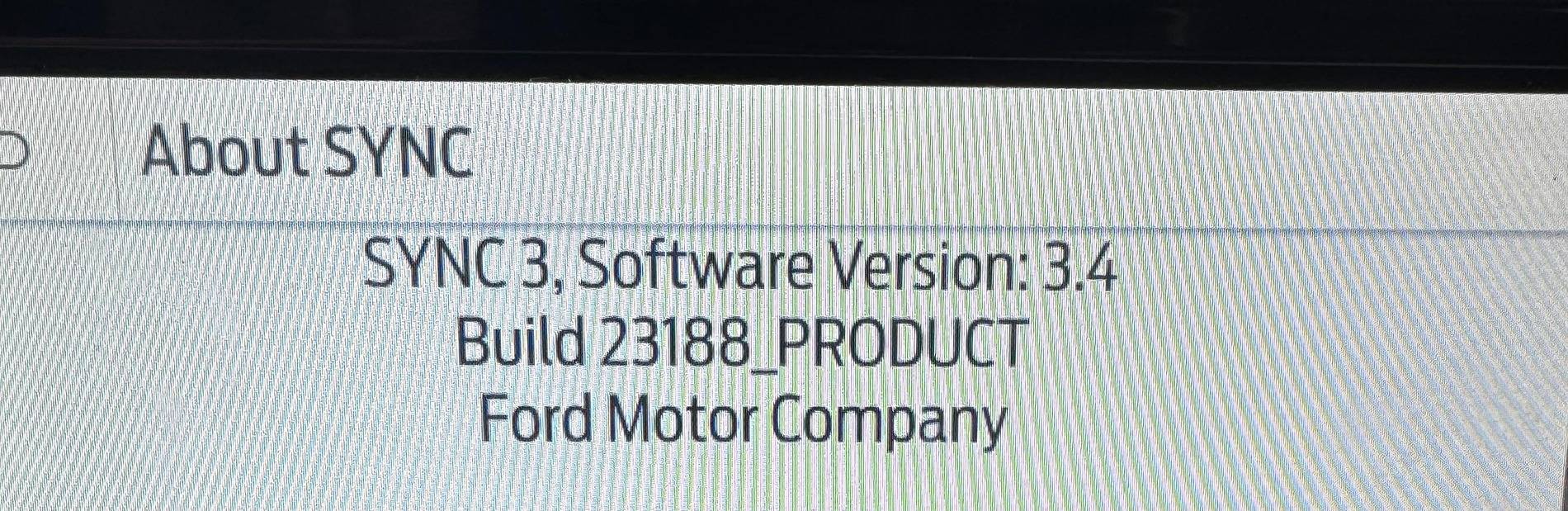
We ask questions to help you solve your issue. We still do not know what Build of SYNC 3.4 you currently have installed. How about taking a photo of the screen showing the Build and posting the photo.
 
OP
OP

Maddy3

Outer Banks
Member
First Name
Madison
Joined
Jul 12, 2021
Threads
3
Messages
24
Reaction score
12
Location
TN
Vehicle(s)
Bronco Sport
Thank you again to everyone that's helping and offering suggestions! Here's are some updates. . . first. . . wait for it. . . the coveted screenshot of the version of Sync that I have. Behold! 23188 :)
-When I said that Google Maps crashes Bluetooth, it doesn't just crash Google Maps, my entire Bluetooth connection with my phone is lost and I have to turn off the car and start it again for it to connect again.
- IOS version 18.3.2
- Battery has been replaced and doesn't have the original anymore
- I just remembered I was wrong about Waze. . . although it doesn't crash my Bluetooth connection and never did, now that I think about it, it never played through phone calls. But Google Maps always did before
- I don't use CarPlay because I'd rather see my regular screen, not the Carplay screen.
- Not always, but sometimes my phone is connected to USB in the center console for charging
- Google Map app settings are set to what y'all mentioned
-Again, I didn't change anything, it just straight up started crashing when I use Google Maps after years of it working. I truly appreciate all of your help, but I think I might have to just give up

Ford Bronco Sport Google Maps Crashes Bluetooth Connection thumbnail (1)
 

Dude

Badlands
Well-Known Member
Joined
Sep 20, 2022
Threads
108
Messages
4,339
Reaction score
5,007
Location
Arizona
Vehicle(s)
2022 Bronco Sport Badlands
…Google Maps crashes Bluetooth, it doesn't just crash Google Maps, my entire Bluetooth connection with my phone is lost and I have to turn off the car and start it again for it to connect again.
@Maddy3
Sounds like a potential hardware issue - either with your iPhone or the vehicles Bluetooth hardware

Have you tried someone else’s iPhone to see if you can maintain a stable Bluetooth (google Maps) connection with a different iPhone?

Have you tried this lately;
1. Power off your iPhone
2. From the Sync Settings menu, unpair the iPhone from SYNC (remove the iPhone)
3. Power on your iPhone and wait for it to boot, log onto the iPhone
4. Pair your iPhone with Sync

After doing the pairing procedure, how long does it take for Bluetooth to stop working while Google maps is running?


Here are some possible other causes - perhaps this will trigger ideas for you:

1. Physical obstacles (like metal objects) can interfere with the Bluetooth signal

Unlikely but possible the iPhone case is causing unstable Bluetooth connections.

2. Interference:
Other Bluetooth devices or wireless networks in your vehicle can potentially interfere with the connection. Try moving the phone or turning off other devices to see if it helps.
 
Last edited:
OP
OP

Maddy3

Outer Banks
Member
First Name
Madison
Joined
Jul 12, 2021
Threads
3
Messages
24
Reaction score
12
Location
TN
Vehicle(s)
Bronco Sport
Thank you so much again, Dude! I tried another iPhone and holy moly, it worked for the short distance I tried it. BUT it's an older iphone only running IOS 16.7.11. The phone that I usually use is on 18.3.2. My thought when this all started was that something w newer versions of IOS aren't compatible w Sync, but that wouldn't explain why I'm apparently the only one having the crashing issue. And I've ruled out the possibility of an unstable IOS update not downloading everything that it needed to because I've updated many times since 16.7.11
 

Me3

Well-Known Member
First Name
Paul
Joined
Mar 4, 2025
Threads
3
Messages
183
Reaction score
272
Location
Northern Nevada
Vehicle(s)
RAV4
Good to know you are updated Maddy. I wonder if google maps just got too big, too much data, to work well over Bluetooth. Mine works fine plugged into the data port just under the dash. CarPlay isn’t so bad. You get used to it. Check all your Bluetooth settings on the car and phone. I notice various settings have changed occasionally after phone updates.
Sponsored


Top