Sync 3.4 Build 22251 Default Issue

OP
OP
thomasm23

thomasm23

Outer Banks
Well-Known Member
First Name
Tom
Joined
Jun 7, 2021
Threads
33
Messages
704
Reaction score
773
Location
Los Angeles Metro
Vehicle(s)
2021 Bronco Sport
Omg wow… That’s gonna be a pretty long time from now. I have an issue with my passenger-side window going up but randomly going down. Has anyone reported this issue related to Sync 3.4.22251?

Do you have an aftermarket tint on that window? The tint may be creating a tight bind causing the window to reverse.
 
First Name
Matthew
Joined
Jul 11, 2023
Threads
0
Messages
21
Reaction score
3
Location
Austin, TX
Vehicle(s)
Ford Escape Hybrid 2020
Do you have an aftermarket tint on that window? The tint may be creating a tight bind causing the window to reverse.
Possibly I'm not sure it came from the factory. Does it have to do with anything software related besides sync?
 

Mark S.

Badlands
Well-Known Member
First Name
Mark
Joined
Oct 30, 2021
Threads
119
Messages
6,733
Reaction score
13,152
Location
St. Jacob, IL
Vehicle(s)
2021 Badlands | 2020 Escape
Possibly I'm not sure it came from the factory. Does it have to do with anything software related besides sync?
This is a safety feature. the window motor incorporates limit switches and a means to measure how hard it's working to close the window. It will automatically reverse when it senses something preventing closure...like a child's head. Something at the limit of travel is impeding window closure on your car. Either that, or the limit switch is malfunctioning and the motor keeps pushing because it doesn't think the window is completely closed.
 
First Name
Matthew
Joined
Jul 11, 2023
Threads
0
Messages
21
Reaction score
3
Location
Austin, TX
Vehicle(s)
Ford Escape Hybrid 2020
This is a safety feature. the window motor incorporates limit switches and a means to measure how hard it's working to close the window. It will automatically reverse when it senses something preventing closure...like a child's head. Something at the limit of travel is impeding window closure on your car. Either that, or the limit switch is malfunctioning and the motor keeps pushing because it doesn't think the window is completely closed.
I definitely agree it’s a safety feature, I’m not sure if the switch is malfunctioning, therefore, will need to double-check with my dealer to see what’s going on.
 

Wazzat

Outer Banks
Well-Known Member
First Name
Kent
Joined
Apr 23, 2023
Threads
4
Messages
74
Reaction score
134
Location
Virginia
Vehicle(s)
2023 Ford Bronco Sport
I definitely agree it’s a safety feature, I’m not sure if the switch is malfunctioning, therefore, will need to double-check with my dealer to see what’s going on.
Try retraining the window motor. Press down and keep pushing the switch down for about three seconds after it hits the bottom. Pull and up and keep holding the switch up for about three seconds after it hits the top. Do this three times in a row and the motor will re-learn its top and bottom position. Works 95% of the time. I have taught a LOT of customers this trick, well not a trick, just info. Hope it works for you!


First Name
Matthew
Joined
Jul 11, 2023
Threads
0
Messages
21
Reaction score
3
Location
Austin, TX
Vehicle(s)
Ford Escape Hybrid 2020
Try retraining the window motor. Press down and keep pushing the switch down for about three seconds after it hits the bottom. Pull and up and keep holding the switch up for about three seconds after it hits the top. Do this three times in a row and the motor will re-learn its top and bottom position. Works 95% of the time. I have taught a LOT of customers this trick, well not a trick, just info. Hope it works for you!
Just tried it and I believe it works! I think it needed some reprogramming! Thank you!
 

Wazzat

Outer Banks
Well-Known Member
First Name
Kent
Joined
Apr 23, 2023
Threads
4
Messages
74
Reaction score
134
Location
Virginia
Vehicle(s)
2023 Ford Bronco Sport
Just tried it and I believe it works! I think it needed some reprogramming! Thank you!
Glad it worked, and saved you a trip to the dealership! I will say though that some dealerships are awesome, and not a bad place to visit! Some have coffee, water, sandwiches, people that care and talk and help. Some dealers would have charged an hour of labor for what I just shared! I'm lucky, I work for a great place! Hope that "fix" stays in place, if not, it was no charge thus far!!!!!
 

Dude

Badlands
Well-Known Member
Joined
Sep 20, 2022
Threads
108
Messages
4,339
Reaction score
5,007
Location
Arizona
Vehicle(s)
2022 Bronco Sport Badlands
Ok let’s get back to OP’s topic “Sync 3.4 Build 22251 Default Issue”.

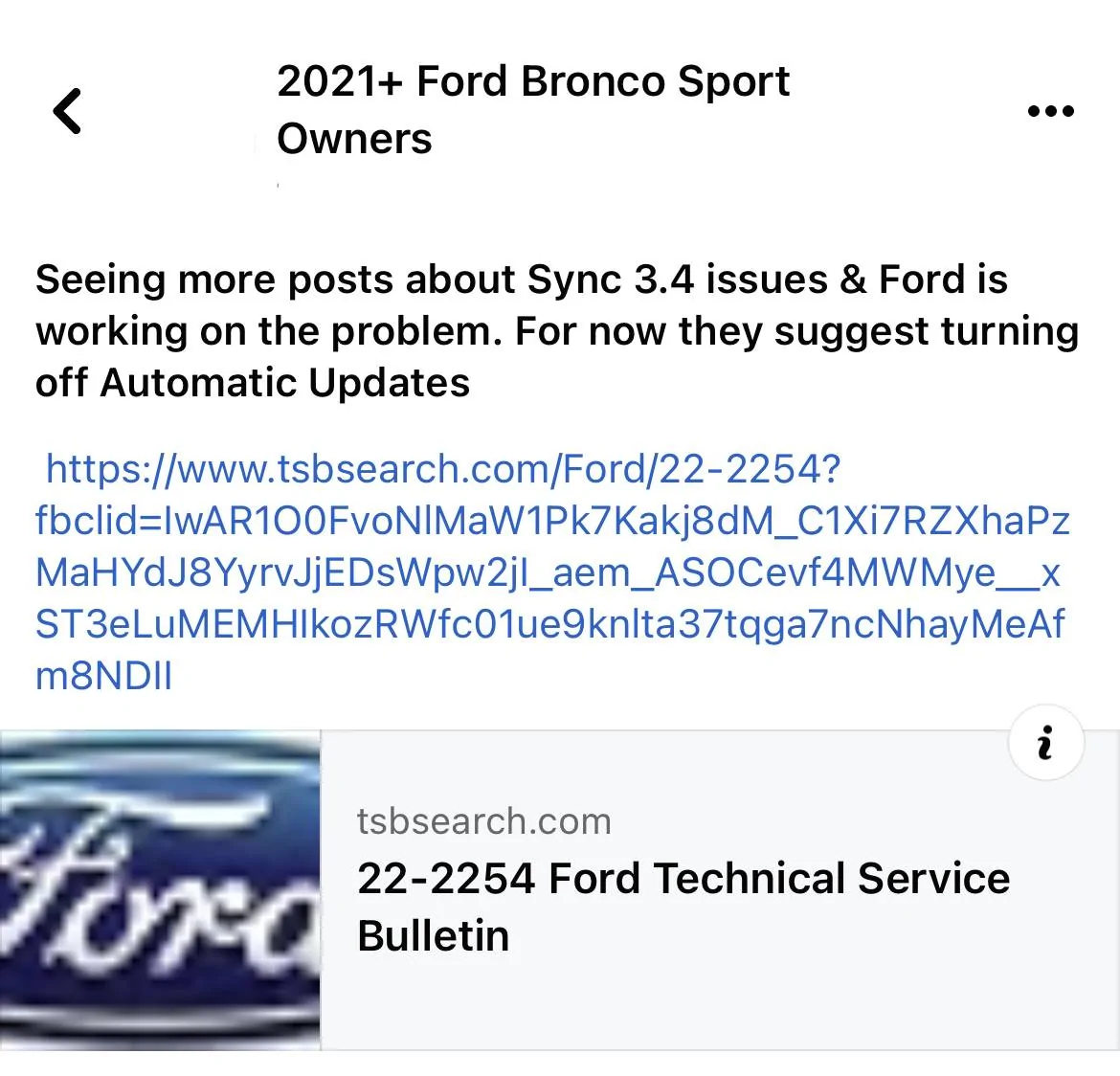
Apparently Ford now also recommends that the Sync Automatic software updates be disabled. See pic which was posted today 7/22/2023 by a Ford Dealership (it is on a Bronco Sport Facebook Group). There is no fix from Ford yet.

Ford Bronco Sport Sync 3.4 Build 22251 Default Issue 1690032521500
 

Robins21

Big Bend
Well-Known Member
First Name
Mike
Joined
Nov 7, 2021
Threads
4
Messages
568
Reaction score
911
Location
Horse Pasture, Virginia
Vehicle(s)
21 Bronco Sport, 05 F150, 69 Stang
A couple days ago my wife was about 4 hours away from home visiting a friend of hers & she went to leave to drive home & could not get her radio or the GPS from her phone to display on the radio screen, all it would do is have the spinning wheel. Her 2021 BS/BB does not have navigation, she just plugs in her smart phone via the usb port & it displays the GPS off the phone giving the directions through the speakers of the radio. She had to disconnect the smart phone from the usb port & use the gps on the phone not displayed on the radio screen. When she got home she told me about it & I went & started the truck & the radio was then working fine. This was the first time this has happened in 30K miles & 1 1/2 years. I did check on the Ford website & it says our BS has the Sync 3.0 generation version 3.4 20282. It also states there is an update available, 3.4 22251.
 

Dude

Badlands
Well-Known Member
Joined
Sep 20, 2022
Threads
108
Messages
4,339
Reaction score
5,007
Location
Arizona
Vehicle(s)
2022 Bronco Sport Badlands
…could not get her radio or the GPS from her phone to display on the radio screen, all it would do is have the spinning wheel. I did check on the Ford website & it says our BS has the Sync 3.0 generation version 3.4 20282. It also states there is an update available, 3.4 22251.
If it happens again have her try this (although simply unplugging the phone and plugging it back in often works too):

RESETTING THE SYNC3 SYSTEM
1. Simultaneously press and hold the seek up (seek forward) and the audio unit power buttons until the screen goes black.
2. Wait three minutes to allow the system to complete the reset.
3. Press the audio unit power button to switch the system on.

If I were you I would disable automatic system updates and not upgrade to 3.4.22251 although for Sync issues to occur with 22251, it probably takes a few months and by then we all hope Ford has released the next Sync update fixing the 22251 issues.

if you decide to disable automatic system updates, you will have to remember to manually check for Sync updates or re-enable automatic system updates at some point in time. also keep in mind the automatic system updates might download other necessary software updates besides just Sync ( I’m not 100% sure on that last point ).


OP
OP
thomasm23

thomasm23

Outer Banks
Well-Known Member
First Name
Tom
Joined
Jun 7, 2021
Threads
33
Messages
704
Reaction score
773
Location
Los Angeles Metro
Vehicle(s)
2021 Bronco Sport
My iPhone would not connect to CarPlay via USB-C port today.

I removed my vehicle from FordPass app. Removed all bluetooth and CarPlay devices. I tried to do a master reset but the selection would freeze on the screen. I did a soft reset by holding down the volume and seek forward buttons for 30 seconds.

I was then able to do a master reset. I repaired the Bluetooth devices and paired the vehicle to FordPass app.

My iPhones now work correctly with CarPlay.

I escalated my Build 22251 issues with Ford Sync support today. There is still no official bulletin from Ford regarding these issues. Support is aware of Build 22251 issues and is aware of Build 23088 coming to fix the issues. But no exact timeline.

I was told I should receive a phone call from the escalation team in a few business days.
 
Last edited:

Dude

Badlands
Well-Known Member
Joined
Sep 20, 2022
Threads
108
Messages
4,339
Reaction score
5,007
Location
Arizona
Vehicle(s)
2022 Bronco Sport Badlands
… Support is aware of Build 22251 issues and is aware of Build 23088 coming to fix the issues. But no exact timeline.

I was told I should receive a phone call from the escalation team in a few business days.
yep, was told by the escalation team the entire Ford software group was working issues deemed by Ford to be more important than the fix for 22251. There is no ETA yet for a fix.

Hope you will get better news in a few business days.


Top