

Sync 3.4 Build 22251 Default Issue

Dude

Badlands
Well-Known Member
Joined
Sep 20, 2022
Threads
108
Messages
4,340
Reaction score
5,009
Location
Arizona
Vehicle(s)
2022 Bronco Sport Badlands
@thomasm23 .. have you had a chance to look at TSB 22-2254 and/or come up with a way to reload 22251 (or maybe an earlier release) to solve the Sync 3.4 Build 22251 settings changing back to default issue?
Sponsored


 
OP
OP
thomasm23

thomasm23

Outer Banks
Well-Known Member
First Name
Tom
Joined
Jun 7, 2021
Threads
33
Messages
708
Reaction score
774
Location
Los Angeles Metro
Vehicle(s)
2021 Bronco Sport
@thomasm23 .. have you had a chance to look at TSB 22-2254 and/or come up with a way to reload 22251 (or maybe an earlier release) to solve the Sync 3.4 Build 22251 settings changing back to default issue?
Not yet. My in vehicle hotspot is not working again. Everything is loosing their settings.
 
OP
OP
thomasm23

thomasm23

Outer Banks
Well-Known Member
First Name
Tom
Joined
Jun 7, 2021
Threads
33
Messages
708
Reaction score
774
Location
Los Angeles Metro
Vehicle(s)
2021 Bronco Sport
Sync 3.4 Build 23088 has been added to CyanLabs. New maps for navigation will come shortly.

I will be waiting for Ford to officially offer the new build and updated maps.

Hopefully, this fixes the defaulting issues.
 
Last edited:

Dude

Badlands
Well-Known Member
Joined
Sep 20, 2022
Threads
108
Messages
4,340
Reaction score
5,009
Location
Arizona
Vehicle(s)
2022 Bronco Sport Badlands
Sync 3.4 Build 23088 has been added to CyanLabs. New maps for navigation will come shortly.

I will be waiting for Ford to officially offer the new build and updated maps.

Hopefully, this fixes the defaulting issues.
That should also mean the Ford 23088 will be a real release and not a bogus version that compares as 22251 content. That’s seems to be the issue with 23088 that got pushed to many Ford vehicles.
 
OP
OP
thomasm23

thomasm23

Outer Banks
Well-Known Member
First Name
Tom
Joined
Jun 7, 2021
Threads
33
Messages
708
Reaction score
774
Location
Los Angeles Metro
Vehicle(s)
2021 Bronco Sport
I am surprised no other BS owners have noticed this issue yet. This is all over F150, Ranger, Explorer and Maverick forums.

Ford dealers have not yet received any information from the factory. Ford Sync tech support is aware of the rwdata issue, but no solution is yet available directly from Ford.

There is a “Jailbreak” solution available, however I would rather wait for an official Ford solution like Sync 3.4 Build 23088 to be released directly from Ford.
 
Last edited:


Sadar

Badlands
New Member
First Name
Alex
Joined
May 25, 2023
Threads
0
Messages
1
Reaction score
0
Location
Canada
Vehicle(s)
Bronco Sport
I have the same issue with v22251
Went to the dealer and they found the problem on the second try. The first time, they just updated the firmware.
Here's what they told me:
We are finding fault the control module for the sync system and have it now ordered, but has to come from the USA so that will be about 10 business days...
 
OP
OP
thomasm23

thomasm23

Outer Banks
Well-Known Member
First Name
Tom
Joined
Jun 7, 2021
Threads
33
Messages
708
Reaction score
774
Location
Los Angeles Metro
Vehicle(s)
2021 Bronco Sport
I have the same issue with v22251
Went to the dealer and they found the problem on the second try. The first time, they just updated the firmware.
Here's what they told me:
This is not a hardware issue. The APIM is not defective. If you are paying for this, you are wasting your money. The issue is a software issue. Logs are being created and filling up the rwdata partition. When this happens, there is not sufficient space for the settings to reside.

New hardware will cause Sync 3.4 Build 22251 to work properly. But when the rwdata partition becomes full again, the same issue will be present.
 

Dude

Badlands
Well-Known Member
Joined
Sep 20, 2022
Threads
108
Messages
4,340
Reaction score
5,009
Location
Arizona
Vehicle(s)
2022 Bronco Sport Badlands
I am surprised no other BS owners have noticed this issue yet. This is all over F150 and Maverick forums.

Ford dealers have not yet received any information from the factory. Ford Sync tech support is aware of the rwdata issue, but no solution is yet available directly from Ford.

There is a “Jailbreak” solution available, however I would rather wait for an official Ford solution like Sync 3.4 Build 23088 to be released directly from Ford.
I haven’t seen much new on 23088 except on the Ranger, Maverick, F-150 Forums. 23088 might not even be intended for Bronco Sports IDK. There are a couple others I’ve seen have similar issues with their 22251 but since the bogus 23088 has the same signature as 22251 it’s impossible to know what happened to their vehicles.

it has not yet been revealed what causes the rwdata partition to fill up but there is still the solution provided in this TSB which probably is the best choice at this time.

TSB 22-2254 SYNC 3 - Various SYNC Symptoms, SYNC Screen Flicker, Echo/Robotic Voice Concerns, Temperature Not Displayed In Pop Up Screen
https://community.cyanlabs.net/uploadsTSB/short-url/xzlS3pmnyk4POB8ROhWjOu1fqOk.pdf
 

Dude

Badlands
Well-Known Member
Joined
Sep 20, 2022
Threads
108
Messages
4,340
Reaction score
5,009
Location
Arizona
Vehicle(s)
2022 Bronco Sport Badlands
@thomasm23

My Sync 3.4 Build 22251 acted up today for the first time exhibiting symptoms that the rwdata partition become full.

The symptoms today included several listed in TSB 22-2254 SYNC 3 - Various SYNC Symptoms:

- Presets not responding or indicating properly (I use the 6 preset option for a total of 36 presets and the System changed that to 2 for a total of 12 presets)

- connection message pop-up every key cycle

- System scrolls through presets on screen

A Sync Reset did not solve the issue, there was no point in performing a Master Reset nor unplugging the battery for hours because those are not going to correct the issue documented in TSB 22-2254.

I’ll need to schedule service to have the Sync system reloaded per TSB 22-2254 (under warranty).

https://community.cyanlabs.net/uploads/short-url/xzlS3pmnyk4POB8ROhWjOu1fqOk.pdf
 
OP
OP
thomasm23

thomasm23

Outer Banks
Well-Known Member
First Name
Tom
Joined
Jun 7, 2021
Threads
33
Messages
708
Reaction score
774
Location
Los Angeles Metro
Vehicle(s)
2021 Bronco Sport
That TSB will not correct this issue. I have been checking with Sync tech support several times a week looking for any status of a new TSB addressing this issue. I called yesterday. Still nothing.

I was reading about someone acknowledging the rwdata partition issue with logs not being compressed and deleted upon vehicle restart. Previous version performed this function.

Another issue, along with the above maybe an Apple CarPlay issue. This may also be contributing to the rwdata partition filling up.

If the dealer is replacing an APIM that is out of warranty and charges the customer, this might and should result in a class-action lawsuit against the factory.


Dude

Badlands
Well-Known Member
Joined
Sep 20, 2022
Threads
108
Messages
4,340
Reaction score
5,009
Location
Arizona
Vehicle(s)
2022 Bronco Sport Badlands
That TSB will not correct this issue. I have been checking with Sync tech support several times a week looking for any status of a new TSB addressing this issue. I called yesterday. Still nothing.

I was reading about someone acknowledging the rwdata partition issue with logs not being compressed and deleted upon vehicle restart. Previous version performed this function.

Another issue, along with the above maybe an Apple CarPlay issue. This may also be contributing to the rwdata partition filling up.

If the dealer is replacing an APIM that is out of warranty and charges the customer, this might and should result in a class-action lawsuit against the factory.
If it’s CarPlay related it also has to be Android Auto related because these Sync issues are occurring with both phone types in the F-150 Forums.
 

Dude

Badlands
Well-Known Member
Joined
Sep 20, 2022
Threads
108
Messages
4,340
Reaction score
5,009
Location
Arizona
Vehicle(s)
2022 Bronco Sport Badlands
I filed a case # last week with Ford (@Ford Motor Company helped with that by adding my details to the case #).

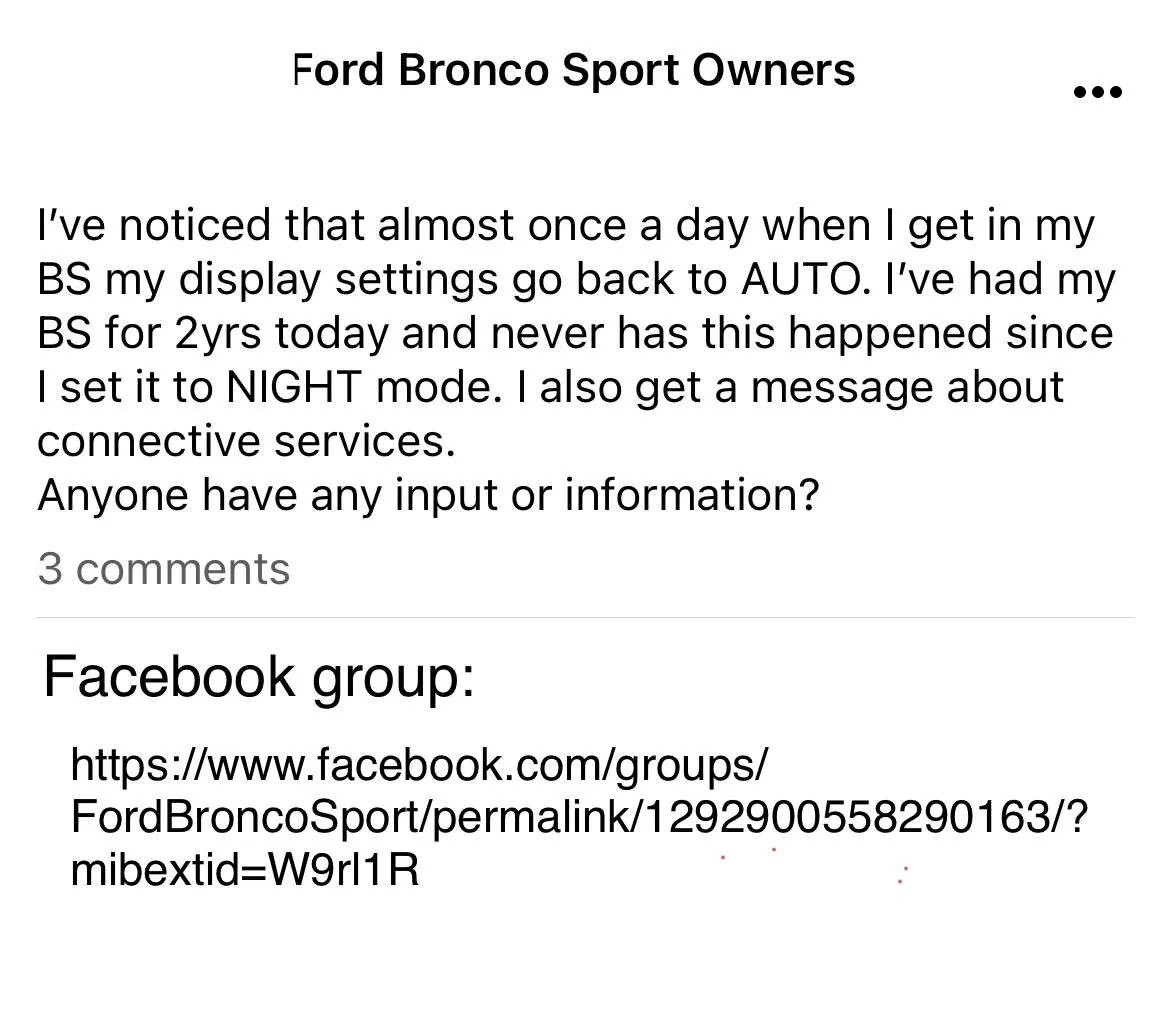
today another person posted on a Fb group they are having the default settings issues posted in this 22251 thread.

Ford Bronco Sport Sync 3.4 Build 22251 Default Issue 1687278090182


@thomasm23 .. any new info from the case # you filed?
 
Last edited:
OP
OP
thomasm23

thomasm23

Outer Banks
Well-Known Member
First Name
Tom
Joined
Jun 7, 2021
Threads
33
Messages
708
Reaction score
774
Location
Los Angeles Metro
Vehicle(s)
2021 Bronco Sport
I have not found the Ford Sync support team very useful. They seem to read a script and then put me on hold while they research the issue.

The latest response from last week was a GSB (General Service Bulletin). This was useless.

Has Ford officially acknowledged that this issue exists? I would love to use a factory solution.

I am tempted to jailbreak and clear the rwdata partition and then use CyanLabs to install build 23088.
 

Dude

Badlands
Well-Known Member
Joined
Sep 20, 2022
Threads
108
Messages
4,340
Reaction score
5,009
Location
Arizona
Vehicle(s)
2022 Bronco Sport Badlands
I have not found the Ford Sync support team very useful. They seem to read a script and then put me on hold while they research the issue.

The latest response from last week was a GSB (General Service Bulletin). This was useless.

Has Ford officially acknowledged that this issue exists? I would love to use a factory solution.

I am tempted to jailbreak and clear the rwdata partition and then use CyanLabs to install build 23088.

I used the Ford internet team (@Ford Motor Company) to create the case # with all the pertinent info needed which I provided by direct messaging that Ford Motor Company alias.

Now I can call the SYNC3 Connected Services Team about my case #:
+1 (833) 389-0848

Then “after some back and forth” you can request to get assigned to one of their Specialists. For example, Daniel was excellent last year on a different software issue I was having.

The above is my suggestion for others having issues with Sync 22251 in their bronco sport.

Daniel
IVT Research Escalation Specialist
Ford CX Team
1-866-631-3788 ext.76377
 
Last edited:

PugDad

Badlands
Well-Known Member
First Name
Bronco Lilly
Joined
Apr 14, 2023
Threads
3
Messages
499
Reaction score
640
Location
Newfoundland,Canada
Vehicle(s)
BSBL
Any solutions in the foreseeable horizon?
I checked my VIN and my BL has the same Sync 3.4 Build 22251. It was just finished being built on the 18th of June. Awaiting shipping.
Sponsored


Top