Sponsored
Bronco ForScan Thread
- Thread starter Airborne_Ape
- Start date
- Watchers 94

Yup I have. No problems.Has anyone successfully changed their tire size now that PCM relearn is available? I got an OBDlink on Prime day and are ready to try.
I'm thinking about upping from 225 to 235. One for looks and two they are cheaper. So just curious I understand correctly. Change the size in BCM then relearn PCM, TCM, and AWD module and you should be good?Yup I have. No problems.
TCM isn't necessary. Just PCM and AWD.I'm thinking about upping from 225 to 235. One for looks and two they are cheaper. So just curious I understand correctly. Change the size in BCM then relearn PCM, TCM, and AWD module and you should be good?
Ok great thanks. So many different "walkthroughs" figured be best from someone who has done it!TCM isn't necessary. Just PCM and AWD.
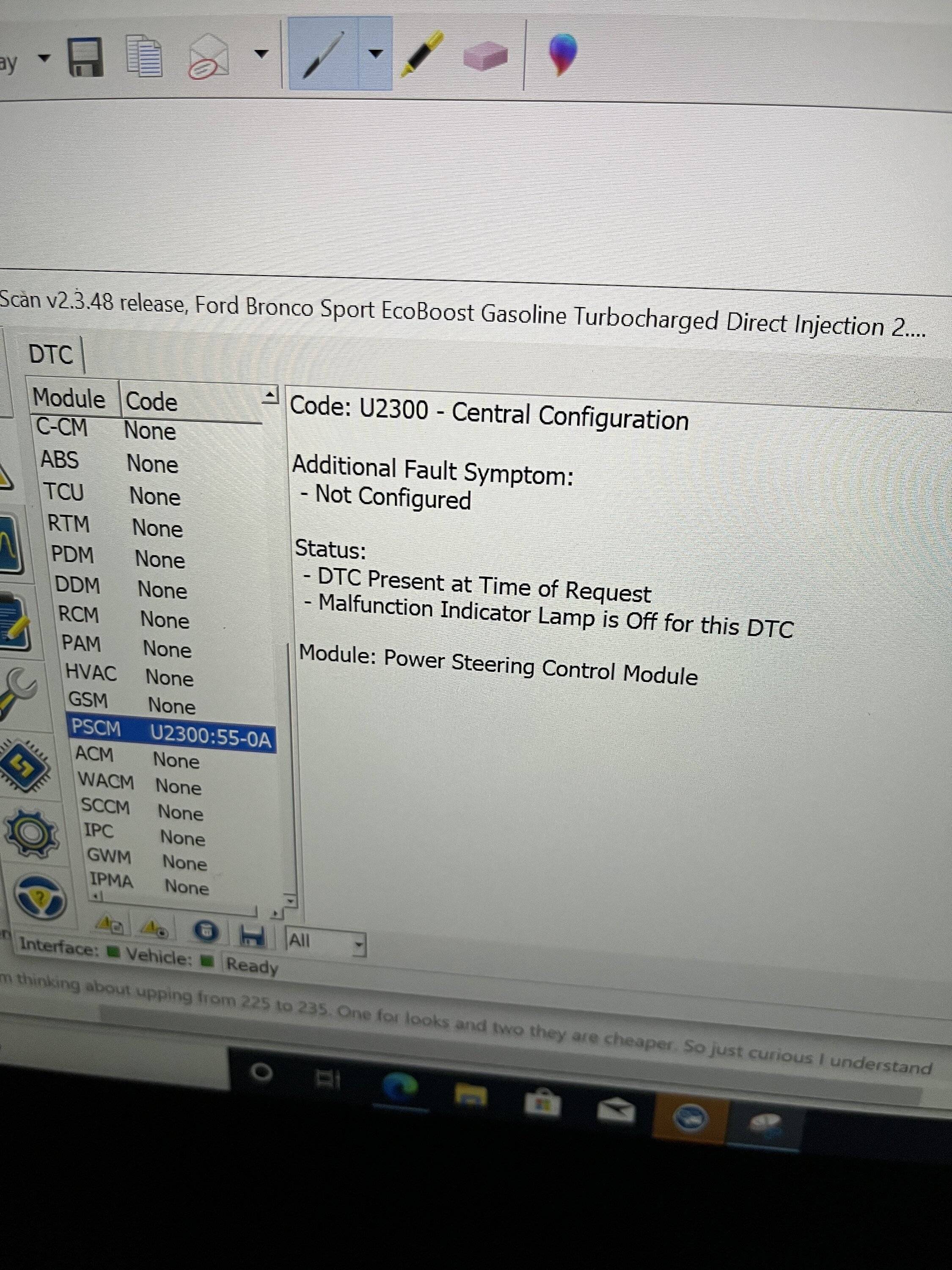
Well my tire change was a no go. The AWD module relearned no issues but the PCM will not relearn. When I go to relearn it states tire circumference outside of module range. Looks like per the workflow that was listed some modules have a max range so mine must. Thankfully I only went from 225/65/17 to 235/65/17...2204 circumference to a 2314...so it only causes about 1 mph difference. I can live with it.
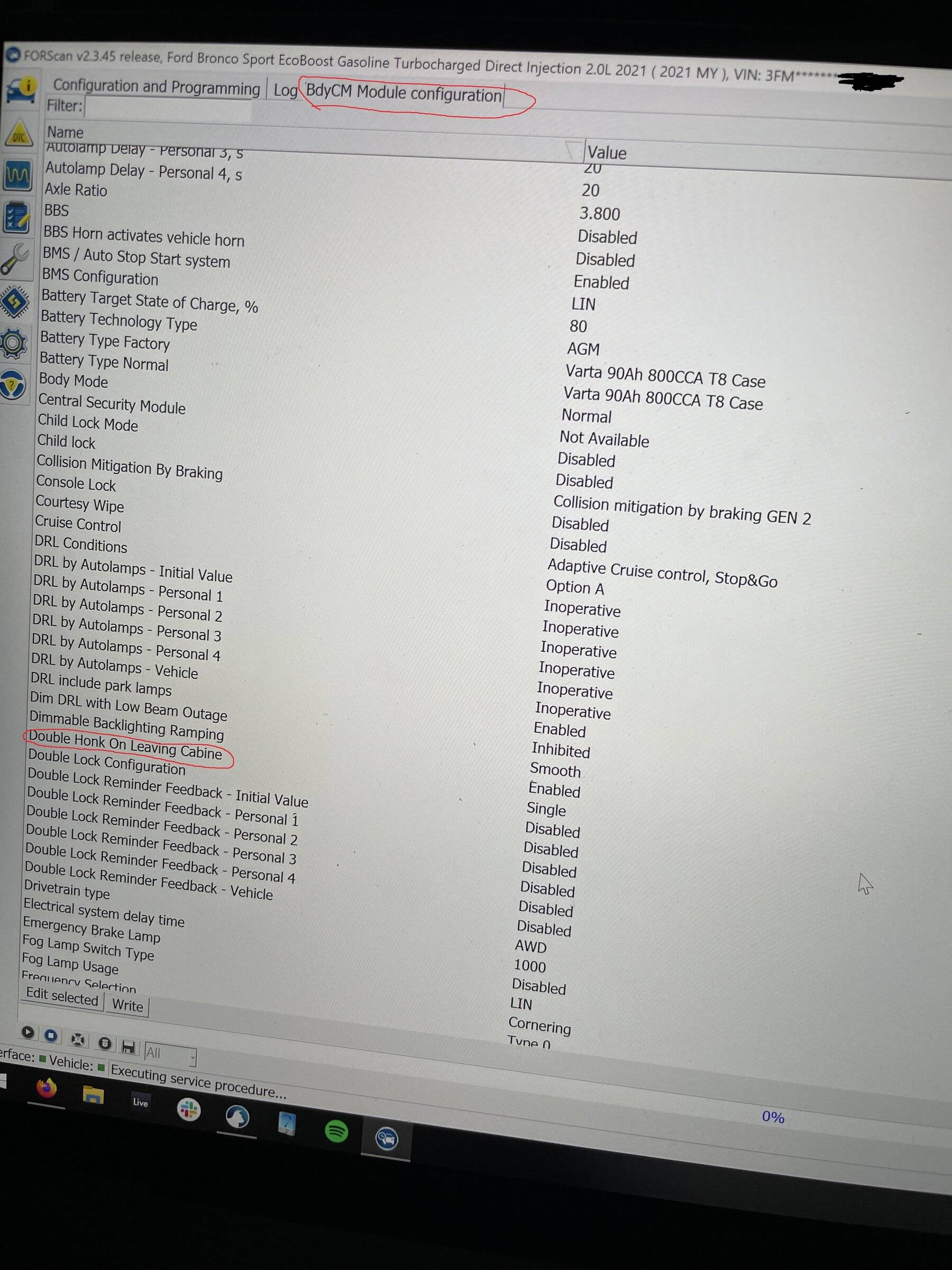
Thanks for this. The double-honk is probably my #1 annoyance. I scared the chit out of my neighbor this afternoon when I got out to check my mail and she was in front of me. After numerous instances of double-honk, that was the last straw so I hooked up Forscan and got rid of it for good.I just received a Vgate vLinker FS ELM327 from Aliexpress about a week after ordering. Disabling double horn honk was really easy following the FORScan Tutorial Document. Looks like Auto Start Stop is there as well but I did not touch that.

$50 to remove the double honk... money well spent
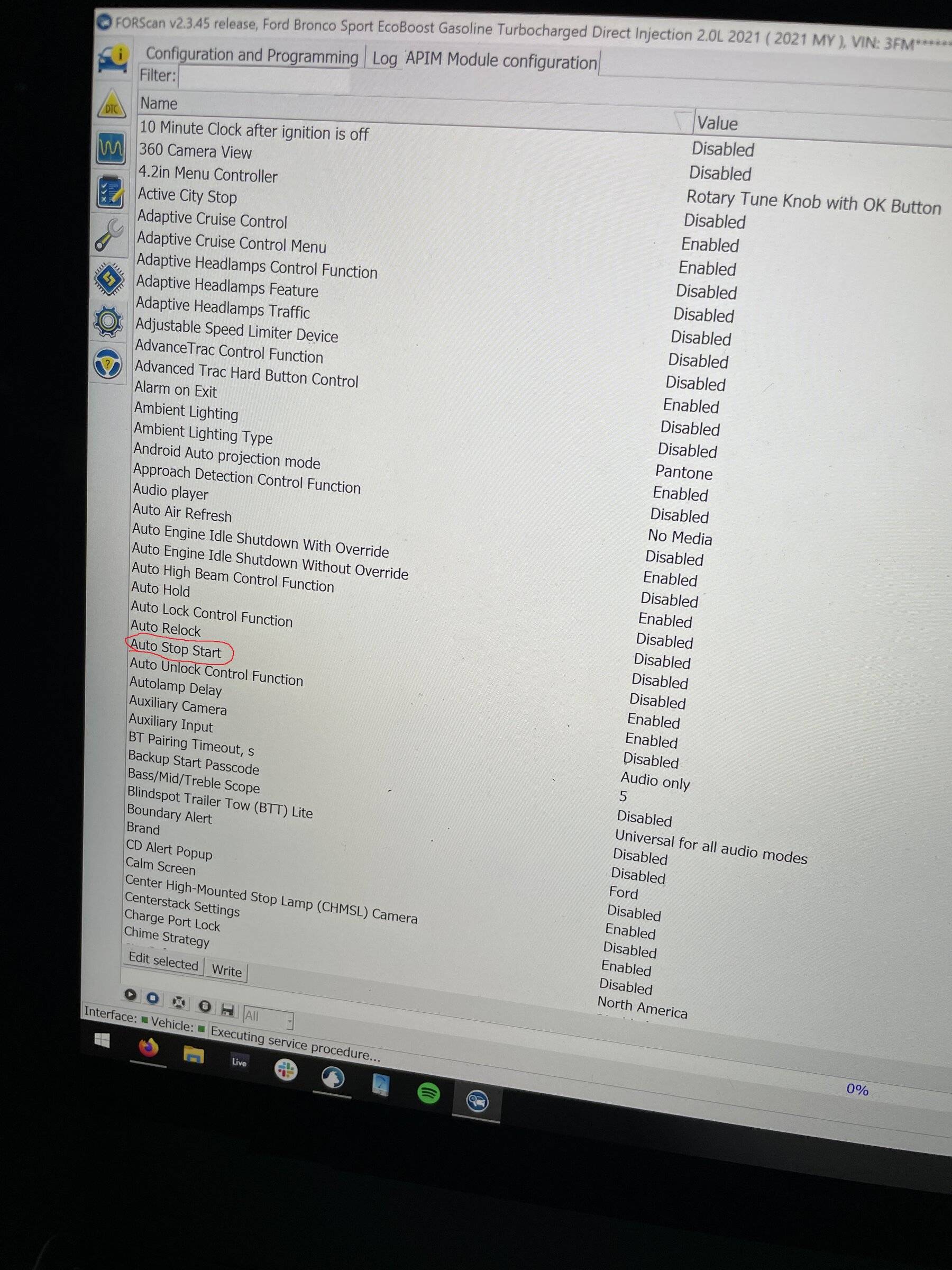
As a side note, I was also able to run the ABS bleed procedure on my '98 Explorer chassis that is under my '54 International. Huge thanks to the Forscan folks for giving us the tools to deal with this stuff!

- First Name
- Brian
- Joined
- May 9, 2022
- Threads
- 0
- Messages
- 119
- Reaction score
- 230
- Location
- Butler, PA-USA
- Vehicle(s)
- 2022 Bronco Sport Big Bend
I followed tutorial 3 times and my bb does not like it even after relearn. My tires are in the BCM as diameter 2210. This is not correct according to tire calculation. It was like this on AB. I change to 235 and it just throws codes. I changed back to AB and all codes resolve. I am just dealing with the speedo off by 1+. Ugh.Yup I have. No problems.
That's interesting. My stock Badlands config was 2202. Do the relearn procedures complete successfully or do they fail? Sometimes I have to do a successful AWD module relearn a couple times to get rid of the error codes. What codes are you getting?I followed tutorial 3 times and my bb does not like it even after relearn. My tires are in the BCM as diameter 2210. This is not correct according to tire calculation. It was like this on AB. I change to 235 and it just throws codes. I changed back to AB and all codes resolve. I am just dealing with the speedo off by 1+. Ugh.
Maybe I didn't remember correctly I thought it was 2204 but I didn't write down like an idiot. But the AWD module relearned fine and no errors. It's the PCM I am getting an error. It says tire circumference out of range of PCM and then it still goes through relearn but because of the error it doesn't relearn it. I'm not sure if it's the issue with a PCM or something I should get with forscan about.That's interesting. My stock Badlands config was 2202. Do the relearn procedures complete successfully or do they fail? Sometimes I have to do a successful AWD module relearn a couple times to get rid of the error codes. What codes are you getting?
- First Name
- Brian
- Joined
- May 9, 2022
- Threads
- 0
- Messages
- 119
- Reaction score
- 230
- Location
- Butler, PA-USA
- Vehicle(s)
- 2022 Bronco Sport Big Bend
I will have to look at my logs tomorrow. I don’t remember the codes. There were 5 I think.That's interesting. My stock Badlands config was 2202. Do the relearn procedures complete successfully or do they fail? Sometimes I have to do a successful AWD module relearn a couple times to get rid of the error codes. What codes are you getting?
- First Name
- Brian
- Joined
- May 9, 2022
- Threads
- 0
- Messages
- 119
- Reaction score
- 230
- Location
- Butler, PA-USA
- Vehicle(s)
- 2022 Bronco Sport Big Bend
(WARN) [13:34:06.241] Checking Bluetooth (F4:73:35:0B:CAThat's interesting. My stock Badlands config was 2202. Do the relearn procedures complete successfully or do they fail? Sometimes I have to do a successful AWD module relearn a couple times to get rid of the error codes. What codes are you getting?
F)...(WARN) [13:34:36.562] Checking FTDI #1
36U2EZ9...(OK) [13:34:37.463] Connection to adapter has been established: FTDI #1
36U2EZ9(OK) [13:34:37.463] Adapter: vLinker FS v2.2.86 MIC3322 V2.0.86 (ELM327 v2.2)
(OK) [13:34:37.546] Connection to vehicle has been established
(OK) [13:34:42.578] Vehicle: Ford Bronco Sport EcoBoost Gasoline Turbocharged Direct Injection 1.5L 2022 ( 2022 MY ), VIN: 3FM*********12311
(OK) [13:34:42.943] Found module: PCM - Powertrain Control Module
(WARN) [13:34:43.232] DTCs in PCM: U0422:00-2F
(OK) [13:34:43.336] Found module: OBDII - On Board Diagnostic II
(OK) [13:34:43.590] Found module: APIM - Accessory Protocol Interface Module
(OK) [13:34:43.645] Found module: BdyCM - Body Control Module
(OK) [13:34:43.670] Found module: BECMB - Battery Energy Control Module B
(OK) [13:34:43.708] Found module: AWD - All Wheel Drive Module
(OK) [13:34:43.766] Found module: SODR - Side Obstacle Detection Control Module - Right
(OK) [13:34:43.827] Found module: SODL - Side Obstacle Detection Control Module - Left
(OK) [13:34:43.875] Found module: ATCM - All Terrain Control Module
(OK) [13:34:43.908] Found module: OCS - Occupant Classification System Module
(OK) [13:34:43.931] Found module: ABS - Antilock braking system
(WARN) [13:34:44.213] DTCs in ABS: U0100:00-28
(OK) [13:34:44.216] Found module: TCU - Telematic Control Unit Module
(OK) [13:34:44.242] Found module: RCM - Restraint Control Module
(OK) [13:34:44.337] Found module: HVAC - Heating Ventilation Air Conditioning
(OK) [13:34:44.379] Found module: GSM - Gear Shift Module
(OK) [13:34:44.408] Found module: PSCM - Power Steering Control Module
(WARN) [13:34:44.594] DTCs in PSCM: U2300:55-0A
(OK) [13:34:44.597] Found module: ACM - Audio Control Module
(OK) [13:34:44.629] Found module: SCCM - Steering Column Control Module
(OK) [13:34:44.689] Found module: IPC - Instrument Panel Control Module
(OK) [13:34:44.726] Found module: GWM - Gateway Module A
(OK) [13:34:44.757] Found module: IPMA - Image Processing Module A
(OK) [13:35:29.091] Successful DTC reset, DTCs will be read now...
(WARN) [13:35:29.391] DTCs in PCM: U0422:00-2F
(WARN) [13:35:30.089] DTCs in PSCM: U2300:55-48
(OK) [13:35:51.713] Successful DTC reset, DTCs will be read now...
(WARN) [13:35:52.010] DTCs in PCM: U0422:00-2F
(WARN) [13:35:52.702] DTCs in PSCM: U2300:55-48
- First Name
- Ron
- Joined
- May 2, 2022
- Threads
- 10
- Messages
- 64
- Reaction score
- 71
- Location
- Elmhurst,IL
- Vehicle(s)
- Bronco Sport-Badlands, BMW330i, Subaru Forester
When it comes to Forscan , I'm a complete newbie. But as I read through this thread, I'm coming to the idea that it's probably useful. What are the things that people are using it for on the Bronco Sport?
Ron Sebonia
Ron Sebonia
- First Name
- Judy and Gerald
- Joined
- Apr 22, 2022
- Threads
- 0
- Messages
- 23
- Reaction score
- 17
- Location
- Cypress Texas
- Vehicle(s)
- 2022 Bronco Sport Badlands
I understand some users here may not be in the Ford eco system at the moment so this thread may seem unusual, but in time, I hope you will learn from this thread how to modify your Bronco and add factory features it may not have shipped with. A lot of what I will discuss here at first will be Sync 3 related, due simply to the fact that the Bronco doesn't really exist at the moment, but it's so much more than that.
Utilities which can be used to splice bits of different Ford's together include, Ford's IDS, UCDSYS, ForScan, FoCCCus. Users in this website will find each of these programs very useful for a broad assortment of reasons which may be discussed here over time.
Linked here is the best ForScan tutorial on the web and will explain nearly all aspects of how to get started.
I have these words of caution: If you're tempted to order a Bronco with the assumption you can add factory features to it later which may not be offered in your tier or trim package; yes it should probably be possible. My warning is that in nearly every example on other Ford forums, it's almost always more difficult, more time consuming, and more costly than just ordering the package or feature from Ford in the first place. This thread will be of more use to owners once used Broncos hit the market a few years from now. Future used car owners don't have the luxury of ordering every option they want from the factory; but you do, so don't cheap out.
I figure the best way to kick off this thread is to explain below how I was able to record the Bronco boot animation in Sync 3. You can enable it for yourself too on any new Ford vehicle since it's not a 'leak' and Ford knowing published the content onto every new model already. Just don't redistribute the content since there's a press embargo, I learned the hard way LOL.
With all the talk now about front cameras needed on all cars, can my BSBL with the basic 360 camera be triggered to operate like the 360+? It seems a lot of the electronics are already in the cars, just not turned on unless you buy the option for $600.
Sponsored