

CarPlay music stops minutes after playing

BeachBuggy

Outer Banks
Active Member
First Name
Scott
Joined
Feb 21, 2025
Threads
5
Messages
29
Reaction score
23
Location
San Diego
Vehicle(s)
Bronco Sport 2024
About 4 minutes into driving the music cuts out. The CarPlay maps still works. Changed 5 different cables and the problem remains. Anybody experience this issue? Thanks for your help.
Sponsored

 

Escape2Bronco

Badlands
Well-Known Member
First Name
Steve
Joined
Oct 9, 2021
Threads
5
Messages
3,394
Reaction score
4,878
Location
Wisconsin
Vehicle(s)
2013 Lexus ES, 2022 Bronco Sport, 2023 Bronco Heritage 2 dr
About 4 minutes into driving the music cuts out. The CarPlay maps still works. Changed 5 different cables and the problem remains. Anybody experience this issue? Thanks for your help.

Which music input or app?
 
OP
OP
BeachBuggy

BeachBuggy

Outer Banks
Active Member
First Name
Scott
Joined
Feb 21, 2025
Threads
5
Messages
29
Reaction score
23
Location
San Diego
Vehicle(s)
Bronco Sport 2024
Youtube Music, didn't have a problem with my other car. What do you suggest? Thanks
 

thomasm23

Outer Banks
Well-Known Member
First Name
Tom
Joined
Jun 7, 2021
Threads
33
Messages
714
Reaction score
783
Location
Los Angeles Metro
Vehicle(s)
2021 Bronco Sport
About 4 minutes into driving the music cuts out. The CarPlay maps still works. Changed 5 different cables and the problem remains. Anybody experience this issue? Thanks for your help.
What Build of SYNC 3.4 do you currently have installed?

What iPhone do you use and what is your currently installed version of iOS on the phone?

 
OP
OP
BeachBuggy

BeachBuggy

Outer Banks
Active Member
First Name
Scott
Joined
Feb 21, 2025
Threads
5
Messages
29
Reaction score
23
Location
San Diego
Vehicle(s)
Bronco Sport 2024
What Build of SYNC 3.4 do you currently have installed?

What iPhone do you use and what is your currently installed version of iOS on the phone?
Just checked.
SYNC 3.4 and iPhone has been kept updated and is updated automatically.
What are your thoughts?


Dude

Badlands
Well-Known Member
Joined
Sep 20, 2022
Threads
108
Messages
4,358
Reaction score
5,035
Location
Arizona
Vehicle(s)
2022 Bronco Sport Badlands
Just checked.
SYNC 3.4 and iPhone has been kept updated and is updated automatically.
What are your thoughts?
You will need to check which Sync 3.4 version, here are the instructions:

To find your Sync 3.4 Build Version (do not scan for updates):

Select SETTINGS tab, then
Select GENERAL tab, then
Select ABOUT SYNC tab

It will show the Build Version

If needed because is not the latest, the step is to manually update to the latest Sync software

Follow Fords instructions at this link to download to your own USB Device then install Sync in your vehicle.

https://www.ford.com/support/sync-maps-updates/

A direct link to the PDF instructions is here: https://www.broncosportforum.com/forum/threads/sync-map-download.12742/post-211555


iPhone specific section:

Make sure your iPhone is on the latest IOS, you said it updates automatically but please confirm is IOS 18.3.1 or latest.

You can try deleting your iPhone off of Sync using Settings on the 8” Display, remove the vehicle from the iPhones Settings (Settings -> CarPlay), then add your iPhone back to Sync and re-set up CarPlay.
 

thomasm23

Outer Banks
Well-Known Member
First Name
Tom
Joined
Jun 7, 2021
Threads
33
Messages
714
Reaction score
783
Location
Los Angeles Metro
Vehicle(s)
2021 Bronco Sport
Just checked.
SYNC 3.4 and iPhone has been kept updated and is updated automatically.
What are your thoughts?
My thoughts?
Bogus answer.

I asked those questions to assist you. Please respond to my questions.

Thank you.
 

Escape2Bronco

Badlands
Well-Known Member
First Name
Steve
Joined
Oct 9, 2021
Threads
5
Messages
3,394
Reaction score
4,878
Location
Wisconsin
Vehicle(s)
2013 Lexus ES, 2022 Bronco Sport, 2023 Bronco Heritage 2 dr
Youtube Music, didn't have a problem with my other car. What do you suggest? Thanks
Have you tried a different app to see if that makes a difference? I use use the XM app on my full size since I don’t have the service for that and it can be glitchy in spots but normally due to the strength of the cell service.

For me, I can’t say that the sync version or IOS version has ever made a difference in the past few years. YMMV.
 
OP
OP
BeachBuggy

BeachBuggy

Outer Banks
Active Member
First Name
Scott
Joined
Feb 21, 2025
Threads
5
Messages
29
Reaction score
23
Location
San Diego
Vehicle(s)
Bronco Sport 2024
You will need to check which Sync 3.4 version, here are the instructions:

To find your Sync 3.4 Build Version (do not scan for updates):

Select SETTINGS tab, then
Select GENERAL tab, then
Select ABOUT SYNC tab

It will show the Build Version

If needed because is not the latest, the step is to manually update to the latest Sync software

Follow Fords instructions at this link to download to your own USB Device then install Sync in your vehicle.

https://www.ford.com/support/sync-maps-updates/

A direct link to the PDF instructions is here: https://www.broncosportforum.com/forum/threads/sync-map-download.12742/post-211555


iPhone specific section:

Make sure your iPhone is on the latest IOS, you said it updates automatically but please confirm is IOS 18.3.1 or latest.

You can try deleting your iPhone off of Sync using Settings on the 8” Display, remove the vehicle from the iPhones Settings (Settings -> CarPlay), then add your iPhone back to Sync and re-set up CarPlay.
Thanks for the answer you supplied. Appreciate your help. Thank you!
 
OP
OP
BeachBuggy

BeachBuggy

Outer Banks
Active Member
First Name
Scott
Joined
Feb 21, 2025
Threads
5
Messages
29
Reaction score
23
Location
San Diego
Vehicle(s)
Bronco Sport 2024
My thoughts?
Bogus answer.

I asked those questions to assist you. Please respond to my questions.

Thank you.
Sorry, I did not know what you were asking. I'm a new owner and did not understand.


OP
OP
BeachBuggy

BeachBuggy

Outer Banks
Active Member
First Name
Scott
Joined
Feb 21, 2025
Threads
5
Messages
29
Reaction score
23
Location
San Diego
Vehicle(s)
Bronco Sport 2024
My thoughts?
Bogus answer.

I asked those questions to assist you. Please respond to my questions.

Thank you.
Any update yet?
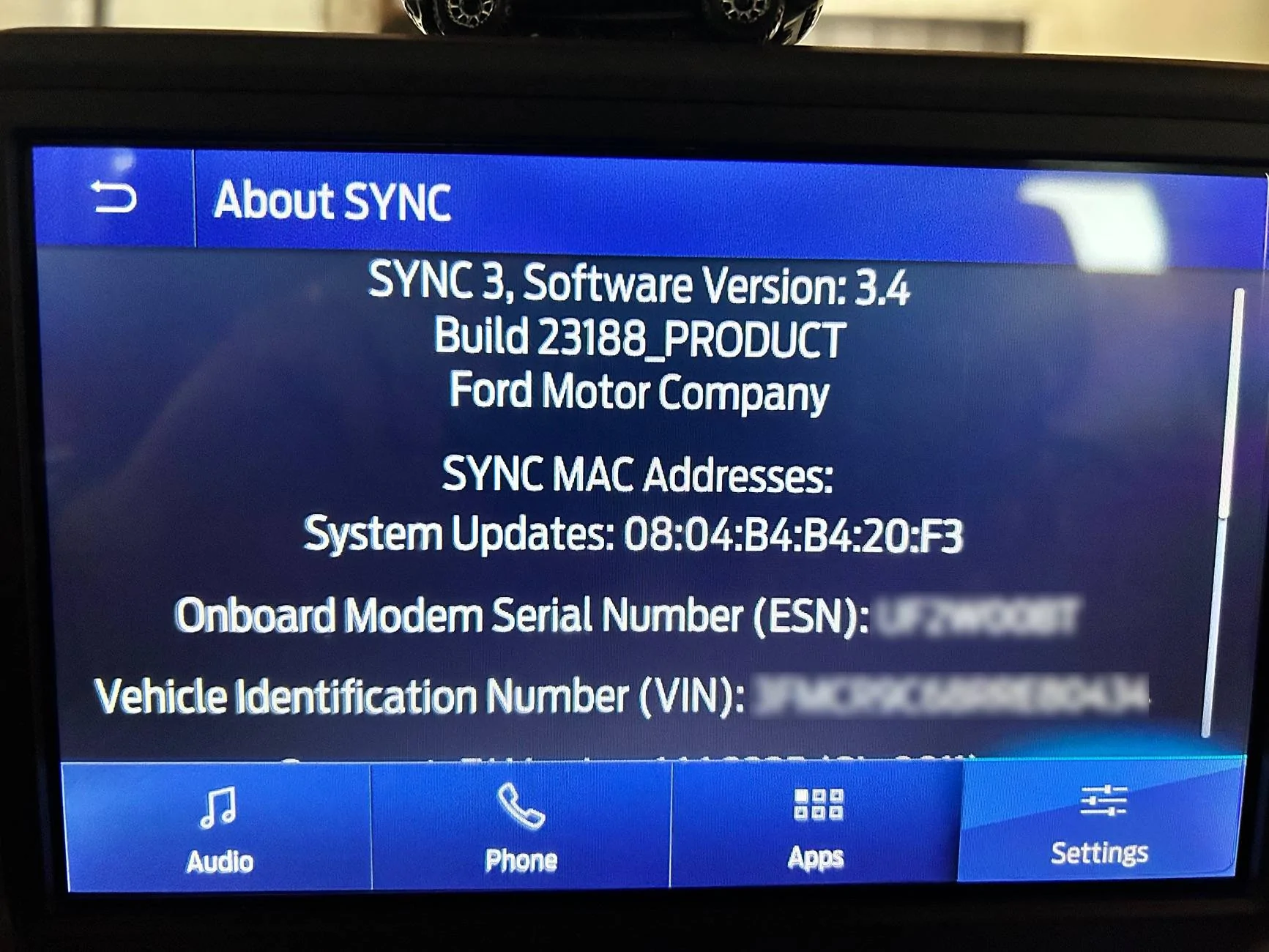
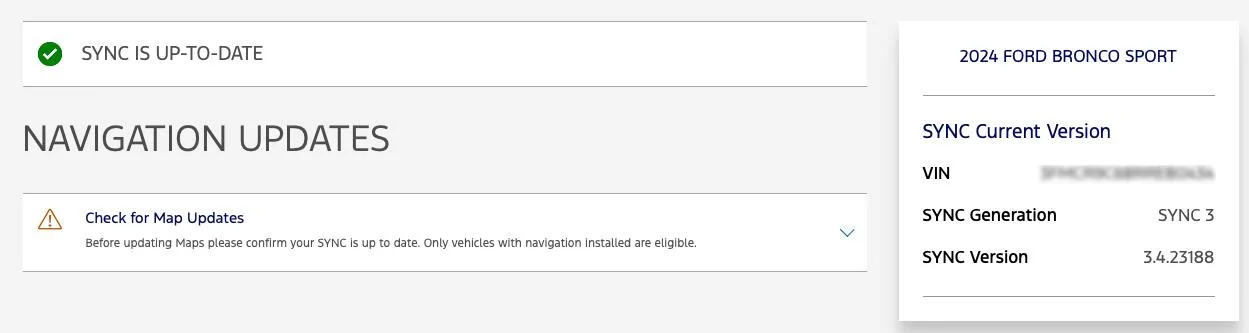
My build is 23188_PRODUCT. I followed Escape2Bronco steps and downloaded the PDF. The website said that I had the latest updates. Went for a long drive after and it did not happen. The CarPlay did not cut out on the music. I will update after a few more drives if the issue comes back. Thanks for reaching out and helping!
 

Dude

Badlands
Well-Known Member
Joined
Sep 20, 2022
Threads
108
Messages
4,358
Reaction score
5,035
Location
Arizona
Vehicle(s)
2022 Bronco Sport Badlands
My build is 23188_PRODUCT. I followed Escape2Bronco steps and downloaded the PDF. The website said that I had the latest updates. Went for a long drive after and it did not happen. The CarPlay did not cut out on the music. I will update after a few more drives if the issue comes back. Thanks for reaching out and helping!
Using Ford’s website is often unreliable for knowing if the vehicle is actually up to date

the only instructions to guarantee you are seeing the installed Sync 3.4 version is the following and these instructions also include checking the iPhone iOS veraion (as in Post #6):

You will need to check which Sync 3.4 version, here are the instructions:

To find your Sync 3.4 Build Version (do not scan for updates):

Select SETTINGS tab, then
Select GENERAL tab, then
Select ABOUT SYNC tab

It will show the Build Version

If needed because is not the latest, the step is to manually update to the latest Sync software

Follow Fords instructions at this link to download to your own USB Device then install Sync in your vehicle.

https://www.ford.com/support/sync-maps-updates/

A direct link to the PDF instructions is here: https://www.broncosportforum.com/forum/threads/sync-map-download.12742/post-211555


iPhone specific section:

Make sure your iPhone is on the latest IOS, you said it updates automatically but please confirm is IOS 18.3.1 or latest.

You can try deleting your iPhone off of Sync using Settings on the 8” Display, remove the vehicle from the iPhones Settings (Settings -> CarPlay), then add your iPhone back to Sync and re-set up CarPlay.

 
OP
OP
BeachBuggy

BeachBuggy

Outer Banks
Active Member
First Name
Scott
Joined
Feb 21, 2025
Threads
5
Messages
29
Reaction score
23
Location
San Diego
Vehicle(s)
Bronco Sport 2024
Using Ford’s website is often unreliable for knowing if the vehicle is actually up to date

the only instructions to guarantee you are seeing the installed Sync 3.4 version is the following and these instructions also include checking the iPhone iOS veraion (as in Post #6):

You will need to check which Sync 3.4 version, here are the instructions:

To find your Sync 3.4 Build Version (do not scan for updates):

Select SETTINGS tab, then
Select GENERAL tab, then
Select ABOUT SYNC tab

It will show the Build Version

If needed because is not the latest, the step is to manually update to the latest Sync software

Follow Fords instructions at this link to download to your own USB Device then install Sync in your vehicle.

https://www.ford.com/support/sync-maps-updates/

A direct link to the PDF instructions is here: https://www.broncosportforum.com/forum/threads/sync-map-download.12742/post-211555


iPhone specific section:

Make sure your iPhone is on the latest IOS, you said it updates automatically but please confirm is IOS 18.3.1 or latest.

You can try deleting your iPhone off of Sync using Settings on the 8” Display, remove the vehicle from the iPhones Settings (Settings -> CarPlay), then add your iPhone back to Sync and re-set up CarPlay.
 
OP
OP
BeachBuggy

BeachBuggy

Outer Banks
Active Member
First Name
Scott
Joined
Feb 21, 2025
Threads
5
Messages
29
Reaction score
23
Location
San Diego
Vehicle(s)
Bronco Sport 2024
Followed your instructions and think I am updated. Thanks for checking in.

Ford Bronco Sport CarPlay music stops minutes after playing IMG_8507


Ford Bronco Sport CarPlay music stops minutes after playing Screenshot 2025-03-03 at 11.16.20 AM


Top