Those are great Android tips Mark.
Here are some more including for iPhone:
Bronco Sport:
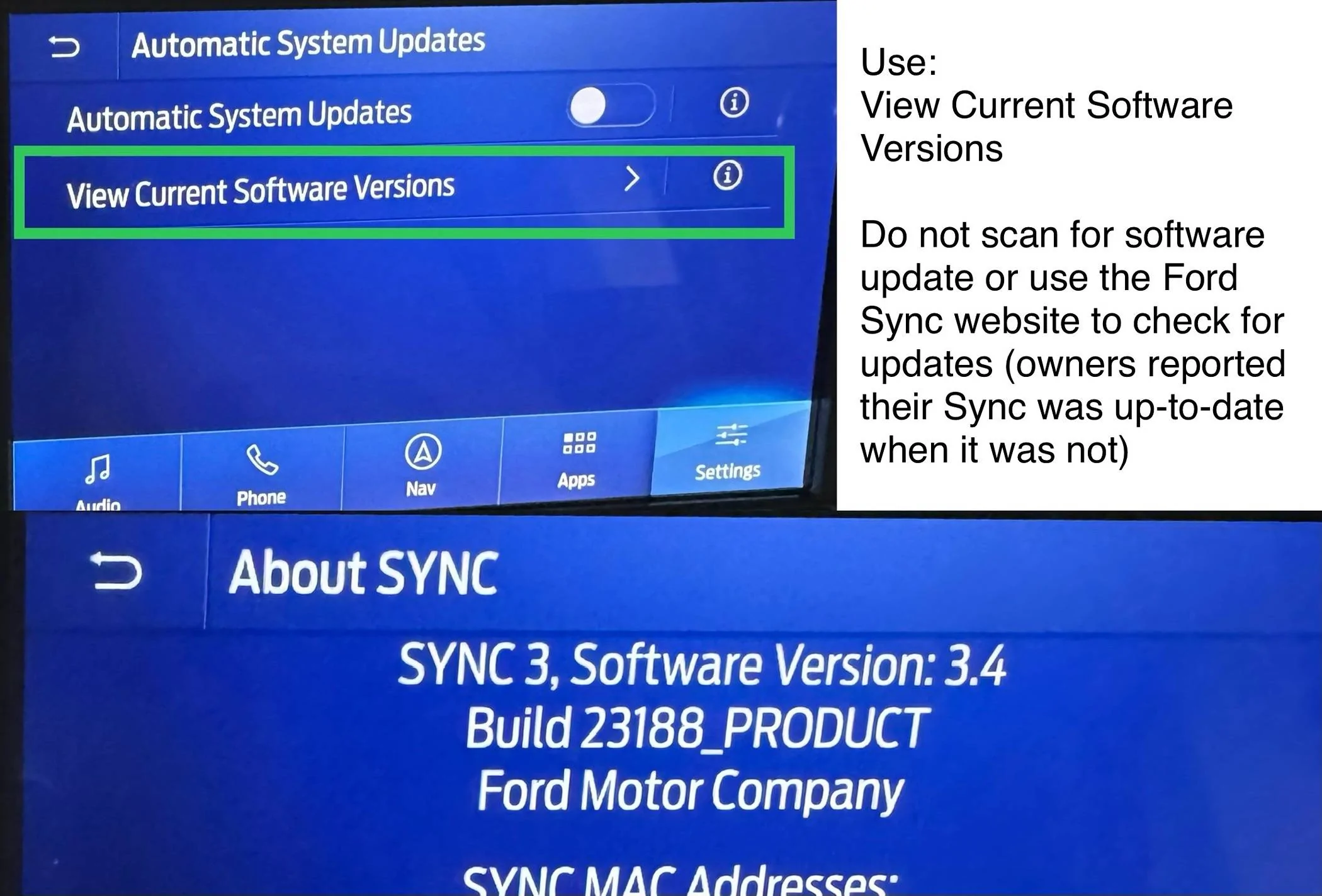
a. Install latest SYNC3 Software (use the 8” Screen Settings and locate the ‘View Current Software Versions’ menu which shows the Sync version currently installed (do not scan for updates and do not use the Ford website to check if latest Sync is installed as those can be unreliable ways to check), verify this version or later is installed:
SYNC 3, Software Version: 3.4 Build 23188 PRODUCT
b. Perform SYNC3 System Reset
c. Perform a Master Reset
See iPhone Step #4 to add the iPhone (Bluetooth and CarPlay)
d. Unplug 12V car battery for 2 minutes and reconnect
iPhone:
1. Reboot the iPhone
2. Install latest IOS Software
3. Replace USB cable with a new Apple Certified USB-C to USB-C Cable (iPhone 15 models and higher), Lightening Cable (iPhone 14 models and lower)
4. Unplug the iPhone from the USB port, delete (remove) the iPhone from SYNC3, plug the iPhone into the USB port, allow iPhone to connect over Bluetooth, allow iPhone to connect with CarPlay.
5. Try a 2nd iPhone (with latest IOS Software)
6. Google and use techniques to clean the iPhone connector
7. Try CarPlay wireless adaptor
Check Fuse:
Find the passenger side fuse box
Locate, remove and test fuse #17: SYNC, Receiver transceiver module, Integrated control panel (mini 15A), replace if bad fuse
If all of the above fails to solve phone charging/connectivity issues:
Schedule service with Dealership and request:
- Run diagnostics on the USB Ports (USB-C, USB-A) below the 8” screen for proper operation
- Test the wiring cable between the above USB Ports and the APIM (SYNC3 Module) including power, ground, fuse, etc. all for proper operation
- Run diagnostics on the APIM (SYNC3 Module)
If necessary, the dealership may need to replace the above USB Ports, replace the wiring cable between the USB Ports and the APIM (SYNC3 Module) and replace the APIM (SYNC3 Module).
Confirm charging/phone connectivity issues are resolved.
Here are some more including for iPhone:
Bronco Sport:
a. Install latest SYNC3 Software (use the 8” Screen Settings and locate the ‘View Current Software Versions’ menu which shows the Sync version currently installed (do not scan for updates and do not use the Ford website to check if latest Sync is installed as those can be unreliable ways to check), verify this version or later is installed:
SYNC 3, Software Version: 3.4 Build 23188 PRODUCT
b. Perform SYNC3 System Reset
c. Perform a Master Reset
See iPhone Step #4 to add the iPhone (Bluetooth and CarPlay)
d. Unplug 12V car battery for 2 minutes and reconnect
iPhone:
1. Reboot the iPhone
2. Install latest IOS Software
3. Replace USB cable with a new Apple Certified USB-C to USB-C Cable (iPhone 15 models and higher), Lightening Cable (iPhone 14 models and lower)
4. Unplug the iPhone from the USB port, delete (remove) the iPhone from SYNC3, plug the iPhone into the USB port, allow iPhone to connect over Bluetooth, allow iPhone to connect with CarPlay.
5. Try a 2nd iPhone (with latest IOS Software)
6. Google and use techniques to clean the iPhone connector
7. Try CarPlay wireless adaptor
Check Fuse:
Find the passenger side fuse box
Locate, remove and test fuse #17: SYNC, Receiver transceiver module, Integrated control panel (mini 15A), replace if bad fuse
If all of the above fails to solve phone charging/connectivity issues:
Schedule service with Dealership and request:
- Run diagnostics on the USB Ports (USB-C, USB-A) below the 8” screen for proper operation
- Test the wiring cable between the above USB Ports and the APIM (SYNC3 Module) including power, ground, fuse, etc. all for proper operation
- Run diagnostics on the APIM (SYNC3 Module)
If necessary, the dealership may need to replace the above USB Ports, replace the wiring cable between the USB Ports and the APIM (SYNC3 Module) and replace the APIM (SYNC3 Module).
Confirm charging/phone connectivity issues are resolved.
Sponsored
Last edited: