USB issues when loading and playing music.

Two-tone

Outer Banks
Member
First Name
Blaine
Joined
Aug 1, 2024
Threads
1
Messages
14
Reaction score
4
Location
Medicine Hat
Vehicle(s)
2021 bronco
I took my 2021 Bronco Sport into the dealership yesterday for issues with the usb. I have a USB 3.0 stick loaded with music. After shutting off the Bronco, it won't go back to the music I was just playing when I drive it again. It says attempting to connect then says can't find device. 15 seconds later, it says it finds it....what the heck? Other times it will find it and play music from where I left off. Other problem is a skip in the song at random on the USB. This happens all the time but not in the same spot in the songs. It's random. The tech couldn't replicate it but when I took him outside, my Bronco could not read the USB. I said "See?" He said he only checked for update and did not hook it up to the Ford connection? Why would you not do everything to find and repair the vehicle? I'm honestly getting tired of recalls and issues with my Bronco. Ford needs to go back to basics and do what Henry Ford intended. Make a reliable vehicle that was easily repairable and affordable. I hate all these bells and whistles that all have to "talk" to one another. I have older car stereos that read USB sticks faster and don't skip.

Sorry for the rant.
Sponsored


Dude

Badlands
Well-Known Member
Joined
Sep 20, 2022
Threads
108
Messages
4,358
Reaction score
5,034
Location
Arizona
Vehicle(s)
2022 Bronco Sport Badlands
I have a USB 3.0 stick loaded with music. After shutting off the Bronco, it won't go back to the music I was just playing when I drive it again. It says attempting to connect then says can't find device. 15 seconds later, it says it finds it....what the heck? Other times it will find it and play music from where I left off. L

Other problem is a skip in the song at random on the USB. This happens all the time but not in the same spot in the songs. It's random.

Sorry for the rant.
The first issue is known and apparently may have no solution. See this post:
https://www.broncosportforum.com/forum/threads/usb-connection-issue.8549/

Random skip while playing music from the USB stick might be fixable - there have been posts on this topic, most involved playing songs from a phone over Bluetooth but a few reported using USB stick.

First thing to check is are you on the latest Sync version:

To find your Sync 3.4 Build Version

(do not scan for updates):

Select SETTINGS tab, then
Select GENERAL tab, then
Select ABOUT SYNC tab
It will show the Build Version (latest is 23188 Product).
 
OP
OP

Two-tone

Outer Banks
Member
First Name
Blaine
Joined
Aug 1, 2024
Threads
1
Messages
14
Reaction score
4
Location
Medicine Hat
Vehicle(s)
2021 bronco
Yes all that has been done. I can play usb music on a 12 year old deck with no issues but a 2021 bronco sport can't? Something wrong here.
 

Dude

Badlands
Well-Known Member
Joined
Sep 20, 2022
Threads
108
Messages
4,358
Reaction score
5,034
Location
Arizona
Vehicle(s)
2022 Bronco Sport Badlands
Yes all that has been done. I can play usb music on a 12 year old deck with no issues but a 2021 bronco sport can't? Something wrong here.
There is no relation to the hardware and software between those two. Different people make different mistakes.

I understand your point but Bronco Sport has its own set of issues. It is what it is.

There are other possible causes of the USB stick music skip on the Bronco Sport besides the Sync version.
 
OP
OP

Two-tone

Outer Banks
Member
First Name
Blaine
Joined
Aug 1, 2024
Threads
1
Messages
14
Reaction score
4
Location
Medicine Hat
Vehicle(s)
2021 bronco
Please enlighten me on other causes for usb not reading and hooking up right away and skipping in music. If you know how to fix this, it should be posted. The usb is a excellent brand 3.0 with correct settings and files.


OP
OP

Two-tone

Outer Banks
Member
First Name
Blaine
Joined
Aug 1, 2024
Threads
1
Messages
14
Reaction score
4
Location
Medicine Hat
Vehicle(s)
2021 bronco
I've had escapes, f150 and a sport track. Never had one issue with USB.
 

Dude

Badlands
Well-Known Member
Joined
Sep 20, 2022
Threads
108
Messages
4,358
Reaction score
5,034
Location
Arizona
Vehicle(s)
2022 Bronco Sport Badlands
Please enlighten me on other causes for usb not reading and hooking up right away and skipping in music. If you know how to fix this, it should be posted. The usb is a excellent brand 3.0 with correct settings and files.
USB stick not always reading on vehicle startup is a known issue and apparently may have no solution. See this post:
https://www.broncosportforum.com/forum/threads/usb-connection-issue.8549/
That’s all I have on that topic. Other owners besides yourself have the issue and I do not recall anyone yet having a guaranteed solution.

USB stick music skip issue:
There are several “alleged” fixes to try for the USB stick music skip which in my prior post I stated there are “possible causes”:

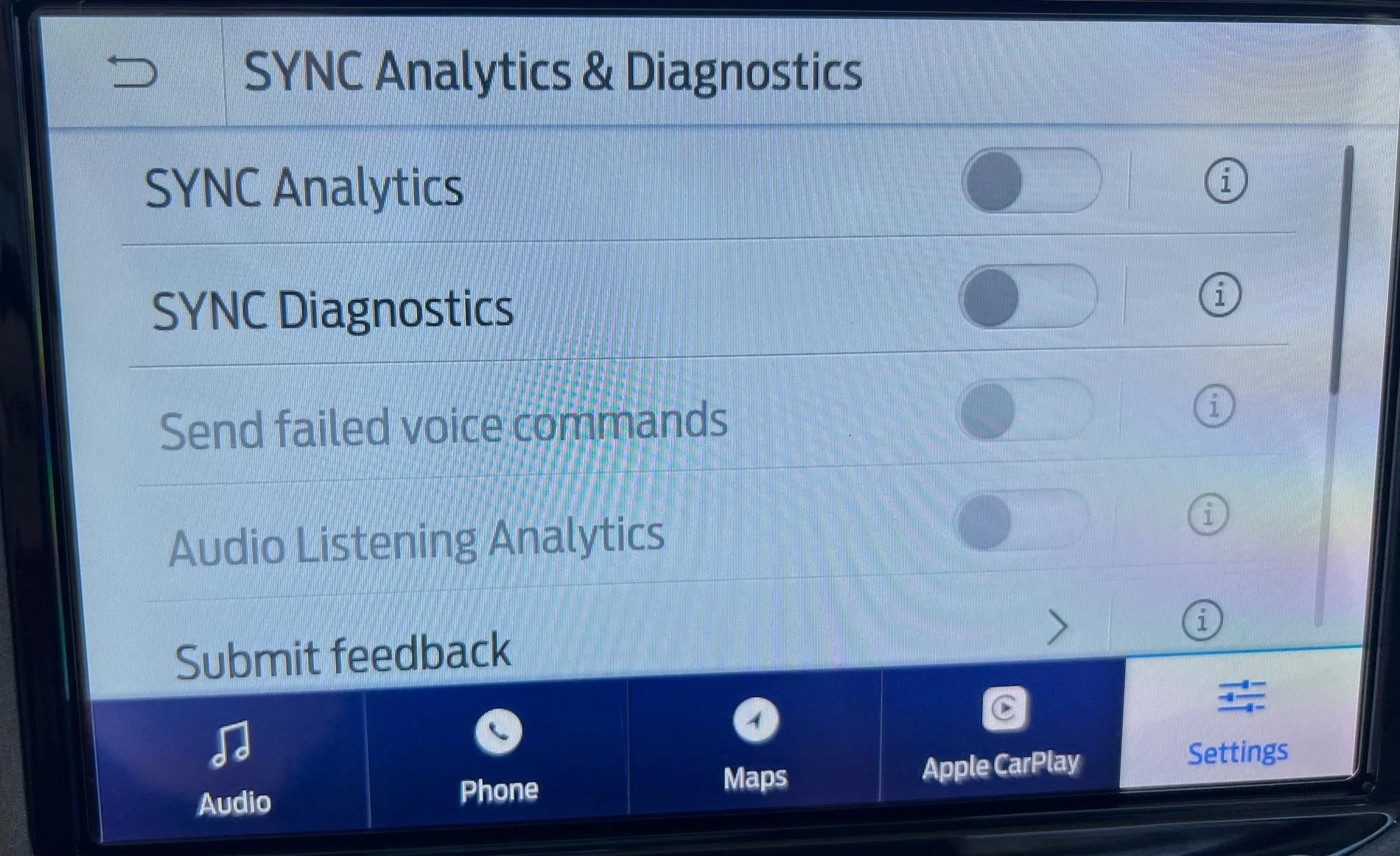
The one I can find quickly because I use myself for reasons other than USB stick music skips is to disable all SYNC Analytics & Diagnostics. These suck up processing reserves on the APIM which is where Sync runs including the software that plays USB stick music, Bluetooth music, etc.

Make sure these as shown in the pic are all disabled and see if that solves the skip issue.


Another possible cause is the USB stick itself. I know you probably used the same USB stick in multiple vehicles with no issues but the processing power of Ford vehicles varies - what works in some vehicles may not work well in the Bronco Sport specifically the USB stick is what I’m referring to.

You won’t like these suggestions but …
1. Create a new music playlist by reformatting the USB stick you have and write say under 50 music tracks. If this also skips occasionally then go with suggestion #2.

2. Purchase a brand new higher read speed USB stick (Read speed is one important spec for USB sticks for music playback). Start with under 50 music tracks.

Ford Bronco Sport USB issues when loading and playing music. IMG_8611
 
OP
OP

Two-tone

Outer Banks
Member
First Name
Blaine
Joined
Aug 1, 2024
Threads
1
Messages
14
Reaction score
4
Location
Medicine Hat
Vehicle(s)
2021 bronco
I see back tracking technology a benefit in vehicles. The common saying don't fix what ain't broke comes to mind ?. What may come off as a rant is confusion and almost disbelief in how I feel. The price of vehicles in today's market also drives up expectations. Understandably so and make sense. I was really hoping the Ford dealership would have been able to fix these issues. Now hearing about so many issues and so called "quirks" above and beyond my broncos problems, I'm starting to think I made a poor choice in my used vehicle purchase.
 

Dude

Badlands
Well-Known Member
Joined
Sep 20, 2022
Threads
108
Messages
4,358
Reaction score
5,034
Location
Arizona
Vehicle(s)
2022 Bronco Sport Badlands
I see back tracking technology a benefit in vehicles. The common saying don't fix what ain't broke comes to mind ?. What may come off as a rant is confusion and almost disbelief in how I feel. The price of vehicles in today's market also drives up expectations. Understandably so and make sense. I was really hoping the Ford dealership would have been able to fix these issues. Now hearing about so many issues and so called "quirks" above and beyond my broncos problems, I'm starting to think I made a poor choice in my used vehicle purchase.
Understood, it is frustrating for sure. I deleted my prior post. Perhaps you will find the quirks to be out weighed by all the great things the Bronco Sport provides. Btw I did get the extended warranty on mine.

There is also this:
https://www.broncosportforum.com/used-vehicle-extended-warranty-at-25-over-dealer-cost-by-granger-motors/


OP
OP

Two-tone

Outer Banks
Member
First Name
Blaine
Joined
Aug 1, 2024
Threads
1
Messages
14
Reaction score
4
Location
Medicine Hat
Vehicle(s)
2021 bronco
You did not respond to this question.

What Build of SYNC 3.4 are you running?
As I said, it was at the dealership and they checked it all. I even checked when I got home and it is the latest build.
 

cprcubed

Big Bend
Well-Known Member
First Name
Patrick
Joined
Nov 16, 2022
Threads
1
Messages
594
Reaction score
957
Location
Parker, TX
Vehicle(s)
2022 Cyber Orange BS BB, 1997 Ford F250 HD 7.3 PSD
As I said, it was at the dealership and they checked it all. I even checked when I got home and it is the latest build.
Why is it so hard to just state what actual build number is? Then there is no question. Cheers!
 

Dude

Badlands
Well-Known Member
Joined
Sep 20, 2022
Threads
108
Messages
4,358
Reaction score
5,034
Location
Arizona
Vehicle(s)
2022 Bronco Sport Badlands
@Two-tone
To find your Sync 3.4 Build Version

(do not scan for updates):

Select SETTINGS tab, then
Select GENERAL tab, then
Select ABOUT SYNC tab
It will show the Build Version (latest is 23188 Product)
 

thomasm23

Outer Banks
Well-Known Member
First Name
Tom
Joined
Jun 7, 2021
Threads
33
Messages
712
Reaction score
783
Location
Los Angeles Metro
Vehicle(s)
2021 Bronco Sport
You have an issue. We are asking questions to help solve your issue.

If we do not know the current Build of SYNC 3.4, then we are just wasting our time.
Sponsored


Top