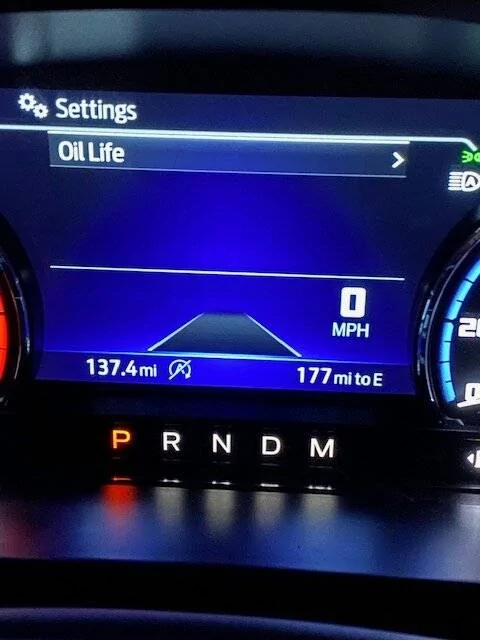
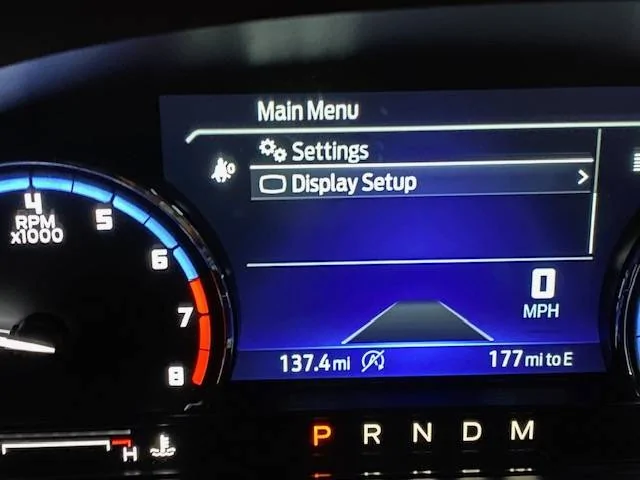
Not much options to set in Settings and Display Setup

kluster

Badlands
Member
First Name
Keith
Joined
Dec 11, 2023
Threads
1
Messages
7
Reaction score
7
Location
Portland, OR
Vehicle(s)
Ford Bronco Sport
I have a recently purchased (few days ago) Bronco Sport Badlands 2023 with Premium Package and Towing. When I checked the options under Menu on the driver side display, the Settings only contain Oil Life and Display Setup only has Speedometer km/h. From what I read in some postings in this forum, Trip2 can be enabled in one of these menus and so are the other options such as Intelligent 4WD, Trailer Lights Check, Seat Belts, etc. The options I have are kind of pathetic and I don't even have Trip2. Does anybody have this same setup? I wonder if there's some sort of system upgrade (outside of Sync 3 as I already upgraded it to the latest) that can be done to make the other options appear. I also looked on the center console, but can't seem to find any settings that would add more options.

Ford Bronco Sport Not much options to set in Settings and Display Setup Display_Setu


Ford Bronco Sport Not much options to set in Settings and Display Setup Settings


Ford Bronco Sport Not much options to set in Settings and Display Setup Menu
 

Dude

Badlands
Well-Known Member
Joined
Sep 20, 2022
Threads
108
Messages
4,345
Reaction score
5,014
Location
Arizona
Vehicle(s)
2022 Bronco Sport Badlands
I have a recently purchased (few days ago) Bronco Sport Badlands 2023 with Premium Package and Towing. When I checked the options under Menu on the driver side display, the Settings only contain Oil Life and Display Setup only has Speedometer km/h. From what I read in some postings in this forum, Trip2 can be enabled in one of these menus and so are the other options such as Intelligent 4WD, Trailer Lights Check, Seat Belts, etc. The options I have are kind of pathetic and I don't even have Trip2. Does anybody have this same setup? I wonder if there's some sort of system upgrade (outside of Sync 3 as I already upgraded it to the latest) that can be done to make the other options appear. I also looked on the center console, but can't seem to find any settings that would add more options.
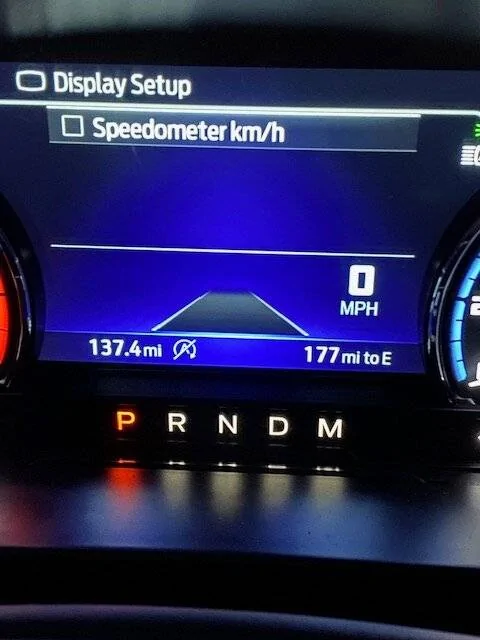
Ford Bronco Sport Not much options to set in Settings and Display Setup Display_Setu


Ford Bronco Sport Not much options to set in Settings and Display Setup Settings


Ford Bronco Sport Not much options to set in Settings and Display Setup Menu
There are more including Trip2 etc ... hint: did you have the engine running or the engine off when you went thru those settings?
 
OP
OP

kluster

Badlands
Member
First Name
Keith
Joined
Dec 11, 2023
Threads
1
Messages
7
Reaction score
7
Location
Portland, OR
Vehicle(s)
Ford Bronco Sport
There are more including Trip2 etc ... hint: did you have the engine running or the engine off when you went thru those settings?
Engine was running when I went thru it.
 
OP
OP

kluster

Badlands
Member
First Name
Keith
Joined
Dec 11, 2023
Threads
1
Messages
7
Reaction score
7
Location
Portland, OR
Vehicle(s)
Ford Bronco Sport


Mark S.

Badlands
Well-Known Member
First Name
Mark
Joined
Oct 30, 2021
Threads
119
Messages
6,733
Reaction score
13,152
Location
St. Jacob, IL
Vehicle(s)
2021 Badlands | 2020 Escape
Check your owner's manual. Look for "Personalized Settings" under "Information Displays." Starts on Pg 98 in my 2021 Owner's Manual.
 
OP
OP

kluster

Badlands
Member
First Name
Keith
Joined
Dec 11, 2023
Threads
1
Messages
7
Reaction score
7
Location
Portland, OR
Vehicle(s)
Ford Bronco Sport
Personalized settings on my manual is on page 109 and it mentions the various screens that can be displayed including Trip1, Trip2, Intelligent 4Wd, etc. which is what I'm looking for. However, I still can't find where this is under menu on the driver display and in the center console display.
 
OP
OP

kluster

Badlands
Member
First Name
Keith
Joined
Dec 11, 2023
Threads
1
Messages
7
Reaction score
7
Location
Portland, OR
Vehicle(s)
Ford Bronco Sport
Checked again today and found that I have to scroll up from the menu to see more of the options. Thanks everyone for your help.
 

Mark S.

Badlands
Well-Known Member
First Name
Mark
Joined
Oct 30, 2021
Threads
119
Messages
6,733
Reaction score
13,152
Location
St. Jacob, IL
Vehicle(s)
2021 Badlands | 2020 Escape
  1. Press the Menu button on the steering wheel.
  2. Press the Up/Down arrow and highlight "Select Screens."
  3. Use the Up/Down and OK buttons to select from available screens.
  4. Press the Back button to exit the menu.
Press the Up/Down keys to cycle through the screens you added. Note that you cannot add all the displays. I believe you are limited to five.


clipperqb

Outer Banks
Member
First Name
Todd
Joined
Nov 20, 2023
Threads
0
Messages
5
Reaction score
9
Location
New Hampshire
Vehicle(s)
2023 Bronco Sport Outer Banks, 2021 F-150 XLT
Thanks for asking the question. We just got a BS couple weeks ago and it doesn't seem as intuitive as the F150
 

Mark S.

Badlands
Well-Known Member
First Name
Mark
Joined
Oct 30, 2021
Threads
119
Messages
6,733
Reaction score
13,152
Location
St. Jacob, IL
Vehicle(s)
2021 Badlands | 2020 Escape
That's exactly what I needed to do. I feel so dumb that it didn't even register in my brain to just scroll up just like int that video. Thanks again for your help!
Not at all! In my years as an instructor and tech writer I've found that different people learn differently. Some can scan through a manual and get everything they need. Others require a more visual approach. Glad to help!
 

mrs mighty

Badlands
Active Member
First Name
Sandee
Joined
Oct 20, 2023
Threads
2
Messages
31
Reaction score
37
Location
Dallas
Vehicle(s)
23 Bronco Sport
  1. Press the Menu button on the steering wheel.
  2. Press the Up/Down arrow and highlight "Select Screens."
  3. Use the Up/Down and OK buttons to select from available screens.
  4. Press the Back button to exit the menu.
Press the Up/Down keys to cycle through the screens you added. Note that you cannot add all the displays. I believe you are limited to five.

Thanks for the awesome help. I just love this video!! I’m learning so much here & loving it. ?
Sponsored


Top