USB A Car Play port stopped working

Smitty1269

Big Bend
Active Member
First Name
Danny
Joined
Mar 31, 2022
Threads
9
Messages
30
Reaction score
8
Location
Bridgewater, NJ
Vehicle(s)
2022 Ford Bronco Sport
My USB A Carplay port under the radio stopped working. Doesn't charge anymore or work with carplay. The Smaller USB C still works but I want to use both. Can I just replace the port for both or are they separately connected. How hard is it to replace with a new one?
Any help?
Sponsored


Dude

Badlands
Well-Known Member
Joined
Sep 20, 2022
Threads
108
Messages
4,339
Reaction score
5,007
Location
Arizona
Vehicle(s)
2022 Bronco Sport Badlands
My USB A Carplay port under the radio stopped working. Doesn't charge anymore or work with carplay. The Smaller USB C still works but I want to use both. Can I just replace the port for both or are they separately connected. How hard is it to replace with a new one?
Any help?
It is one module containing both the USB-A and USB-C. You might want to first shine a strong light and maybe try using your phones magnifier to see if something got into the USB-A port that could be ā€˜cleaned out’.

Then see if this info is useful to you…

USB Module Interface (USB Media Hub) (below 8ā€ Display)
Illuminated USB Ports (USB-A, USB-C) Engineering number: K7EDB ML3T-14F014-BB is part number: ML3Z*19A387*E (ML3Z-19A387-E)
Installation: https://www.broncosportforum.com/forum/threads/illuminated-usb-hub-installation.10308/

Within the above link will be this link:
https://www.broncosportforum.com/forum/threads/illuminated-usb-media-port-diy-install.10162/post-177574
 
Last edited:

Mwittke5857

Big Bend
Well-Known Member
First Name
Michael
Joined
Dec 29, 2023
Threads
6
Messages
782
Reaction score
1,188
Location
Elma, NY
Vehicle(s)
2021 Bronco
My USB A Carplay port under the radio stopped working. Doesn't charge anymore or work with carplay. The Smaller USB C still works but I want to use both. Can I just replace the port for both or are they separately connected. How hard is it to replace with a new one?
Any help?
I can deal with it loosing my iPhone connection, but now when I plug my iPhone in, it no longer shows maps in the infotainment screen although in my case, it still appears to charge my phone. Is this the problem you are having as well?
 
OP
OP

Smitty1269

Big Bend
Active Member
First Name
Danny
Joined
Mar 31, 2022
Threads
9
Messages
30
Reaction score
8
Location
Bridgewater, NJ
Vehicle(s)
2022 Ford Bronco Sport
I can deal with it loosing my iPhone connection, but now when I plug my iPhone in, it no longer shows maps in the infotainment screen although in my case, it still appears to charge my phone. Is this the problem you are having as well?
No. I am just not getting any power or anything from the USB A Port. C Port works fine
 
OP
OP

Smitty1269

Big Bend
Active Member
First Name
Danny
Joined
Mar 31, 2022
Threads
9
Messages
30
Reaction score
8
Location
Bridgewater, NJ
Vehicle(s)
2022 Ford Bronco Sport
It is one module containing both the USB-A and USB-C. You might want to first shine a strong light and maybe try using your phones magnifier to see if something got into the USB-A port that could be ā€˜cleaned out’.

Then see if this info is useful to you…

USB Module Interface (USB Media Hub) (below 8ā€ Display)
Illuminated USB Ports (USB-A, USB-C) Engineering number: K7EDB ML3T-14F014-BB is part number: ML3Z*19A387*E (ML3Z-19A387-E)
Installation: https://www.broncosportforum.com/forum/threads/illuminated-usb-hub-installation.10308/

Within the above link will be this link:
https://www.broncosportforum.com/forum/threads/illuminated-usb-media-port-diy-install.10162/post-177574
Do you really need to take the whole console apart to get that module out? Can't get it out with plastic clips? Really asking..


Dude

Badlands
Well-Known Member
Joined
Sep 20, 2022
Threads
108
Messages
4,339
Reaction score
5,007
Location
Arizona
Vehicle(s)
2022 Bronco Sport Badlands
Do you really need to take the whole console apart to get that module out? Can't get it out with plastic clips? Really asking..
You do not .. there is another post on that method but unfortunately does scratch up the plastic. You should be able to find that post with the search tool.
 

Dude

Badlands
Well-Known Member
Joined
Sep 20, 2022
Threads
108
Messages
4,339
Reaction score
5,007
Location
Arizona
Vehicle(s)
2022 Bronco Sport Badlands
I've tried 20 cables. None work.
Thought so but I’d still try the flashlight with a magnifying glass just to see if you can tell the
USB-A port looks clean. You probably already tried wiggling the plugged in portion too.

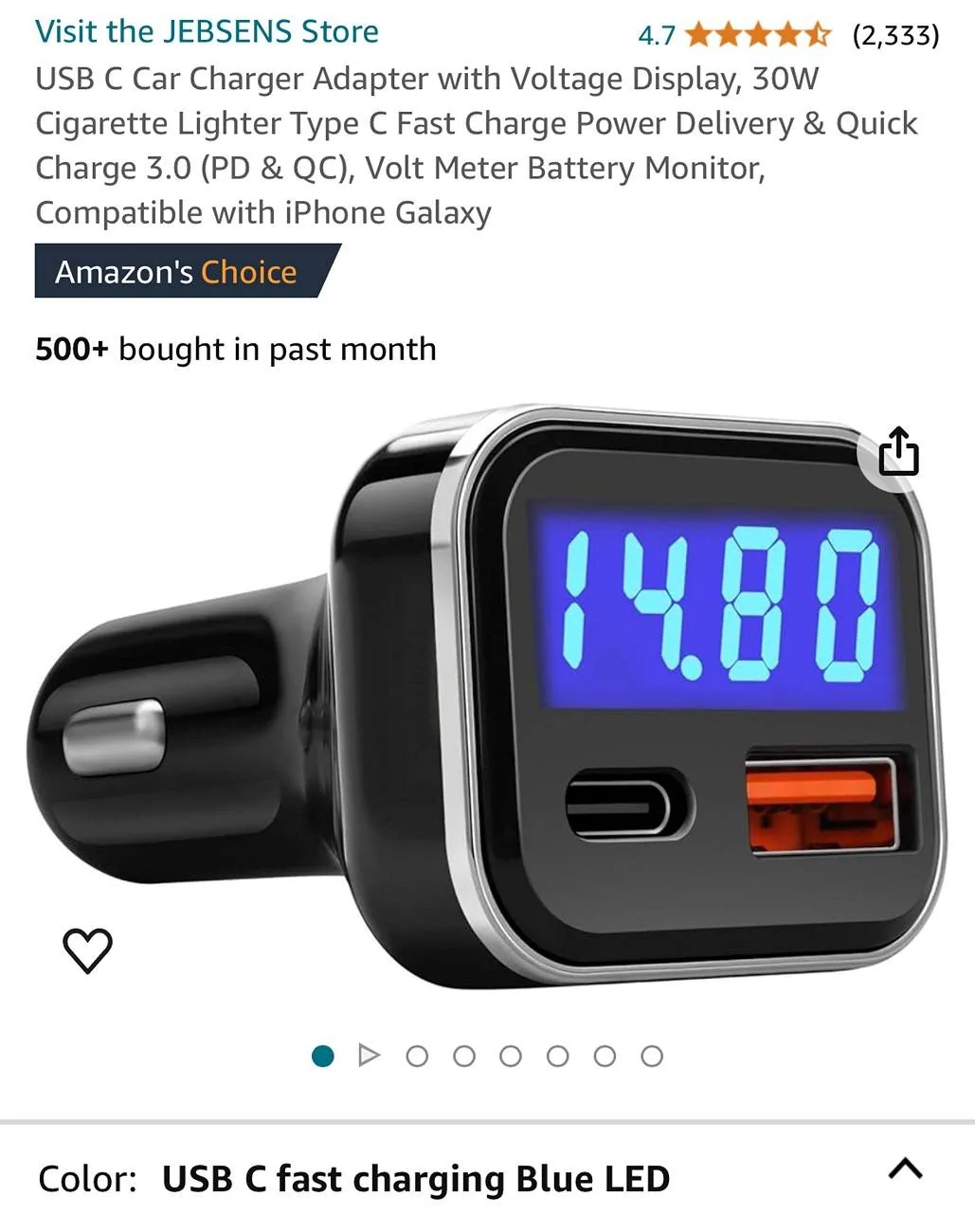
I’d probably skip the port replacement and plug one of these in which provides 2 more USB ports and a voltmeter. Cheaper too.

Ford Bronco Sport USB A Car Play port stopped working IMG_9283
 
OP
OP

Smitty1269

Big Bend
Active Member
First Name
Danny
Joined
Mar 31, 2022
Threads
9
Messages
30
Reaction score
8
Location
Bridgewater, NJ
Vehicle(s)
2022 Ford Bronco Sport
I thought of that but want carplay to work. Only works from the port under the dash


Dude

Badlands
Well-Known Member
Joined
Sep 20, 2022
Threads
108
Messages
4,339
Reaction score
5,007
Location
Arizona
Vehicle(s)
2022 Bronco Sport Badlands
I thought of that but want carplay to work. Only works from the port under the dash
Yes agreed but that’s why I only use the USB-C cable with my iPhone - it charges the iPhone faster than -A and data transfers over a USB-C data cable is faster (but that won’t matter with CarPlay).

I’m guessing you have iPhone 14 or earlier which is why you have a lot of USB-A cables … when I had the 13 I bought high quality data cables … USB-C to Apple lightning port but my 15 has a USB-C port.

The only real solution if you are sure the -A port has gone bad is the effort it takes to remove and replace. Sorry.
 

kshaw

Outer Banks
Well-Known Member
First Name
Kent
Joined
Oct 14, 2023
Threads
22
Messages
296
Reaction score
305
Location
Gaithersburg, MD
Vehicle(s)
Bronco Sport; 350Z; Porsche Boxster S; Hybrid Escape
FWIW, I had several issues with short cables. My goal was to get rid of the wire spaghetti with 7" cables and I had all kinds of issues. It seems that 14" or longer work pretty reliable. Also, when I have connection issues, I put a few drops of ACF-50 in the ports and I can sometimes resurrect electronic devices. Spraying circuit boards can sometimes bring those back to life.
 

mdwheaton

Outer Banks
Well-Known Member
First Name
Matthew
Joined
Sep 17, 2021
Threads
4
Messages
90
Reaction score
54
Location
Texas
Vehicle(s)
Ford Bronco Sport
My USB A Carplay port under the radio stopped working. Doesn't charge anymore or work with carplay. The Smaller USB C still works but I want to use both. Can I just replace the port for both or are they separately connected. How hard is it to replace with a new one?
Any help?
2021 Outer Banks
I've had this happen at least 2 times. I tried everything, and thought maybe a fuse was blown. Chasing my tail. BOTH times, a reset to factory in the SYNC settings fixed it.
Sponsored


Top