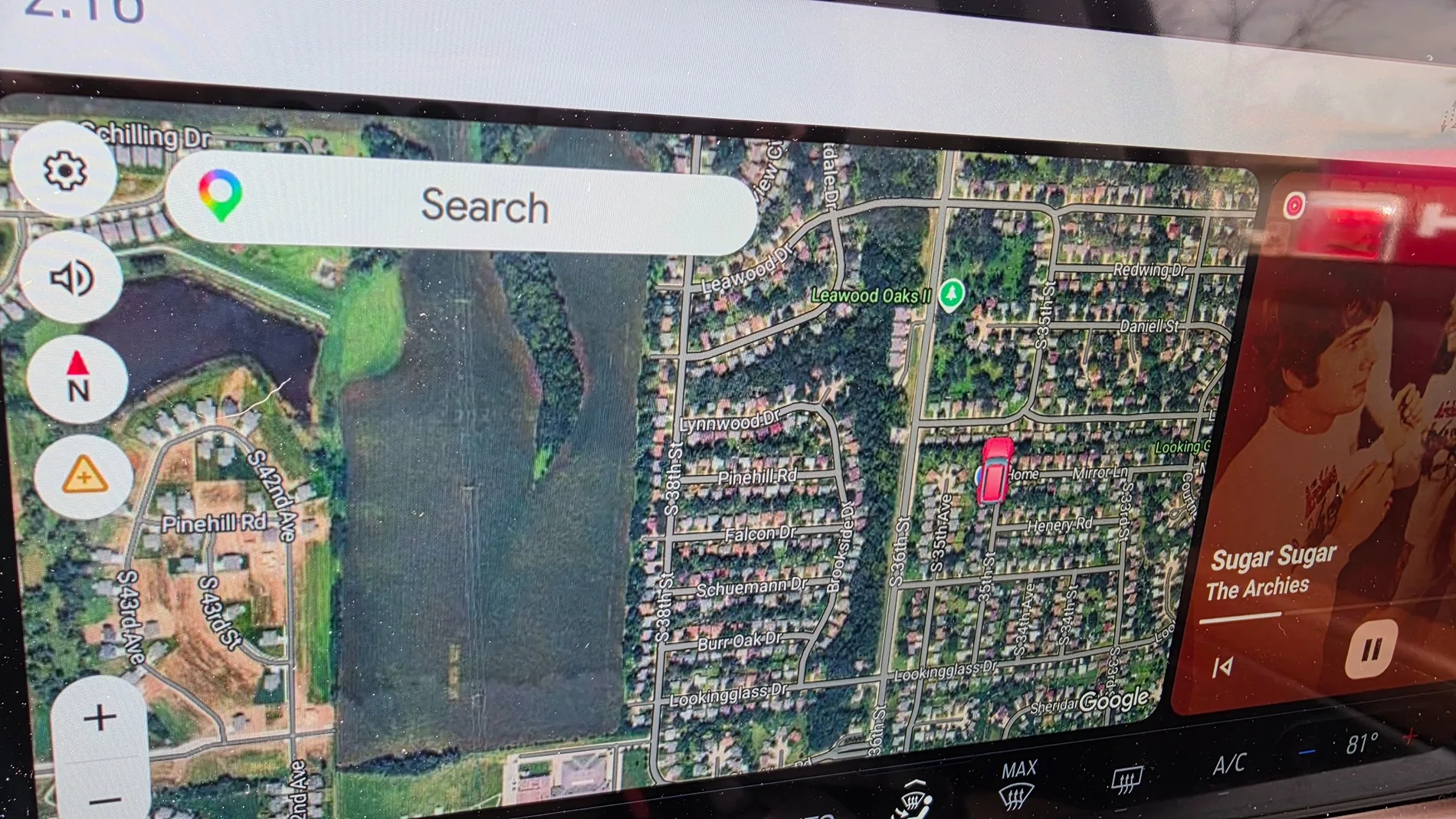

Android Auto Maps 3D image

OP
OP
Schuelady

Schuelady

Outer Banks
Well-Known Member
First Name
Tami
Joined
Aug 16, 2024
Threads
7
Messages
359
Reaction score
499
Location
Nebraska
Vehicle(s)
Plan on getting 2025 Bronco Sport
And that was the immersive 3D I thought you were referring to but your android has had various 3D features for awhile now
Ya, I'm going to have to try some of the things it mentioned!
Sponsored


gstalnaker

Big Bend
Member
First Name
Guy
Joined
Sep 19, 2025
Threads
2
Messages
18
Reaction score
40
Location
Wisconsin
Vehicle(s)
2025 Bronco Big Bend
So, my Google Maps is updated. While doing some more investigations, I saw that even through my car's screen,
So to make a long story short, turned out I had to change the settings on my new phone to satellite!

Ford Bronco Sport Android Auto Maps 3D image 20260326_141608
Scheulady - on this screencap, the third round icon from the top, left below the Audio Mute control shows that this map display is in the "2D North Up" mode. That's the icon with the Red Triangle pointing up and the N below it. This icon is more than a visual display, it's a control that shifts the Google Maps display between three modes: 1. 2D North Up (as shown; north is always up and the map moves left, right, up, down as you drive); 2. An "Overview" mode that zooms out, still I think in 2D mode; 3. 3D, Map displays and shifts in the direction you travel (that is, rather than "north always up" your direction of travel is towards the top of the display and the map swings around as you turn, etc.; the 3D part of the settings relates to whether the buidings shown on this display appear to have height, depth, and width, not tha the map is in 3D mode). NOTE: these three modes to NOT appear unless you are in your vehicle, with Android Auto connectd, and Google Maps active (I just checked with my cell phone sitting next to my laptop and tapping on this contral shifts between only two modes).


Top