
Rear Liftgate Passive Entry Inoperative

JamesT

Badlands
Well-Known Member
First Name
James
Joined
Jul 16, 2020
Threads
23
Messages
478
Reaction score
537
Location
Seattle
Vehicle(s)
GMC Canyon, Fiat Spider 124, Bronco Sport Badlands
Has this happened to you: Suddenly, the rear liftgate (the door, not the window) no longer unlocks when the keyfob is near it. It used to work and now it doesn't.

Today, I learned that this is due to pressing the liftgate button on the keyfob once. (This is the button on the keyfob that has the hatch and 2X). It turns out that pressing it once disables the passive entry function for the liftgate. Presumably, you want to do this to keep someone from entering the vehicle from the rear when you have unlocked the front door.

Apparently, I accidentally did this. And could not figure out what happened. (I blamed it on a software update!)

The fix is easy: Press the liftgate button twice on the passive key fob. Voila.

I'm sure this is in the manual but I failed to see it and it has been a minor inconvenience for a long time.

So, I want to give a shout out to Peter I., the service rep at Bickford Ford in Snohomish, WA. I was in for my very first oil change. When I told him about the issue, he didn't know the answer. But after I had left, he called me up, said that he had been on the internal Ford forums and had found a posting with the cause and fix.

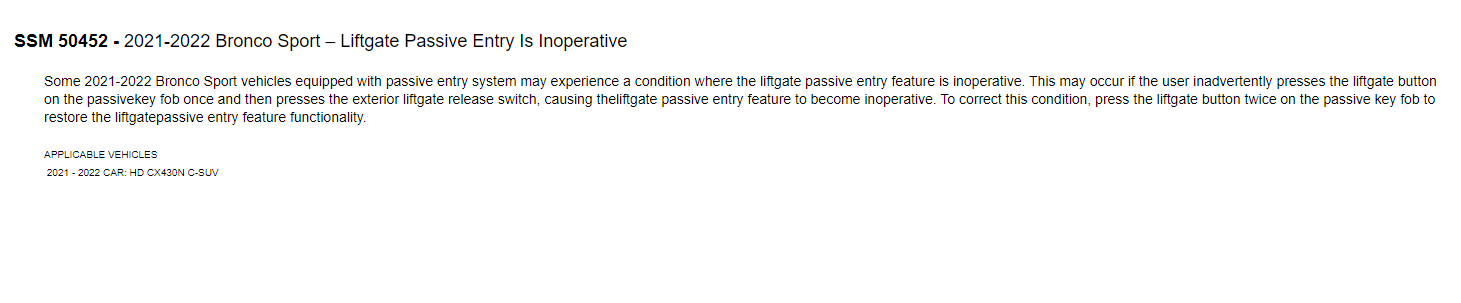
Ford Bronco Sport Rear Liftgate Passive Entry Inoperative broncoliftgate passive entry issue).PNG


I suppose that is why I am a fan of this dealership. They seem to go above and beyond, at least for me.

Anyway, lesson learned. Happy Tuesday... almost Groundhogs day.
Sponsored

 

MaxVelocity

Badlands
Well-Known Member
Joined
Sep 20, 2021
Threads
1
Messages
378
Reaction score
453
Location
Montana
Vehicle(s)
1970 Bronco
Today, I learned that this is due to pressing the liftgate button on the keyfob once. (This is the button on the keyfob that has the hatch and 2X). It turns out that pressing it once disables the passive entry function for the liftgate. P
According to this post, it happens by pressing the fob button followed by using the button on the liftgate.

https://www.broncosportforum.com/forum/threads/liftgate-does-not-open-with-intelligent-access-but-glass-does.3081/post-84239

Edit deleted image already posted.
 

760Bronco

Big Bend
Well-Known Member
First Name
Michael
Joined
Mar 15, 2021
Threads
14
Messages
262
Reaction score
430
Location
Palm Springs
Vehicle(s)
Bronco sport
I did all that, can now successfully open the back hatch without taking the key out of my pocket. The only thing is the alarm goes off when I shut the hatch door. Anyone know how to get it to stop?
 

WinTech

Big Bend
Well-Known Member
First Name
Shawn
Joined
Oct 12, 2021
Threads
5
Messages
161
Reaction score
184
Location
Washinton State
Vehicle(s)
2021 Bronco Sport BB, 2022 Passport, 2023 HR-V
Thanks for this. I followed some other instructions that seemed to have fixed it but a week later it wasn't working again. Just verified that these instructions consistently fix the issue. I don't even really understand why that is a feature. Why would you want to disable the smart entry on the hatch?
 

Mark S.

Badlands
Well-Known Member
First Name
Mark
Joined
Oct 30, 2021
Threads
119
Messages
6,733
Reaction score
13,152
Location
St. Jacob, IL
Vehicle(s)
2021 Badlands | 2020 Escape
I did all that, can now successfully open the back hatch without taking the key out of my pocket. The only thing is the alarm goes off when I shut the hatch door. Anyone know how to get it to stop?
You mean it continuously honks the horn, or you get two honks? If you're getting two honks it usually means you are attempting to lock the car with the key fob inside the car or with one or more doors not fully closed. If it's the alarm (continuous honking) I can't help with that.


OP
OP
JamesT

JamesT

Badlands
Well-Known Member
First Name
James
Joined
Jul 16, 2020
Threads
23
Messages
478
Reaction score
537
Location
Seattle
Vehicle(s)
GMC Canyon, Fiat Spider 124, Bronco Sport Badlands
Thanks for this. I followed some other instructions that seemed to have fixed it but a week later it wasn't working again. Just verified that these instructions consistently fix the issue. I don't even really understand why that is a feature. Why would you want to disable the smart entry on the hatch?
I suppose there is a use case (I only want the driver door to unlock so that I don't unlock everything and some bad guy jumps into the car through a different door) but it is not that compelling. And even so, why would you put that in the key fob where you are most likely going to accidentally turn it off. That seems like it is primed to cause inadvertent actions.

"Just because you can does not mean you should."
 

WinTech

Big Bend
Well-Known Member
First Name
Shawn
Joined
Oct 12, 2021
Threads
5
Messages
161
Reaction score
184
Location
Washinton State
Vehicle(s)
2021 Bronco Sport BB, 2022 Passport, 2023 HR-V
I suppose there is a use case (I only want the driver door to unlock so that I don't unlock everything and some bad guy jumps into the car through a different door) but it is not that compelling. And even so, why would you put that in the key fob where you are most likely going to accidentally turn it off. That seems like it is primed to cause inadvertent actions.

"Just because you can does not mean you should."
Never thought about that. I never paid attention to whether or not opening the hatch with the smart entry unlocks all the other doors. To me it would make sense to just unlock and open the hatch because if you have smart entry when you go to the driver or passenger door with the keys it's going to unlock too. I know in our Honda you can change the way smart entry works as far as which doors unlock. I'll probably look and see if there is something similar in the BS.
 

johnnyoknows

Badlands
Member
First Name
John
Joined
Feb 14, 2021
Threads
3
Messages
24
Reaction score
48
Location
Boise, ID
Vehicle(s)
Ford Bronco Sport
Picked my BS BL up last week and today noticed the same issue. (Really frustrating when you have a handful of groceries and it had been working perfectly fine before!) Searched “passive entry” here and stumbled onto your solution… thanks so much for posting!
Sponsored


Top